
Comparisons
Best Photogrammetry Software in 2026, Compared for Drone Mapping and 3D Models
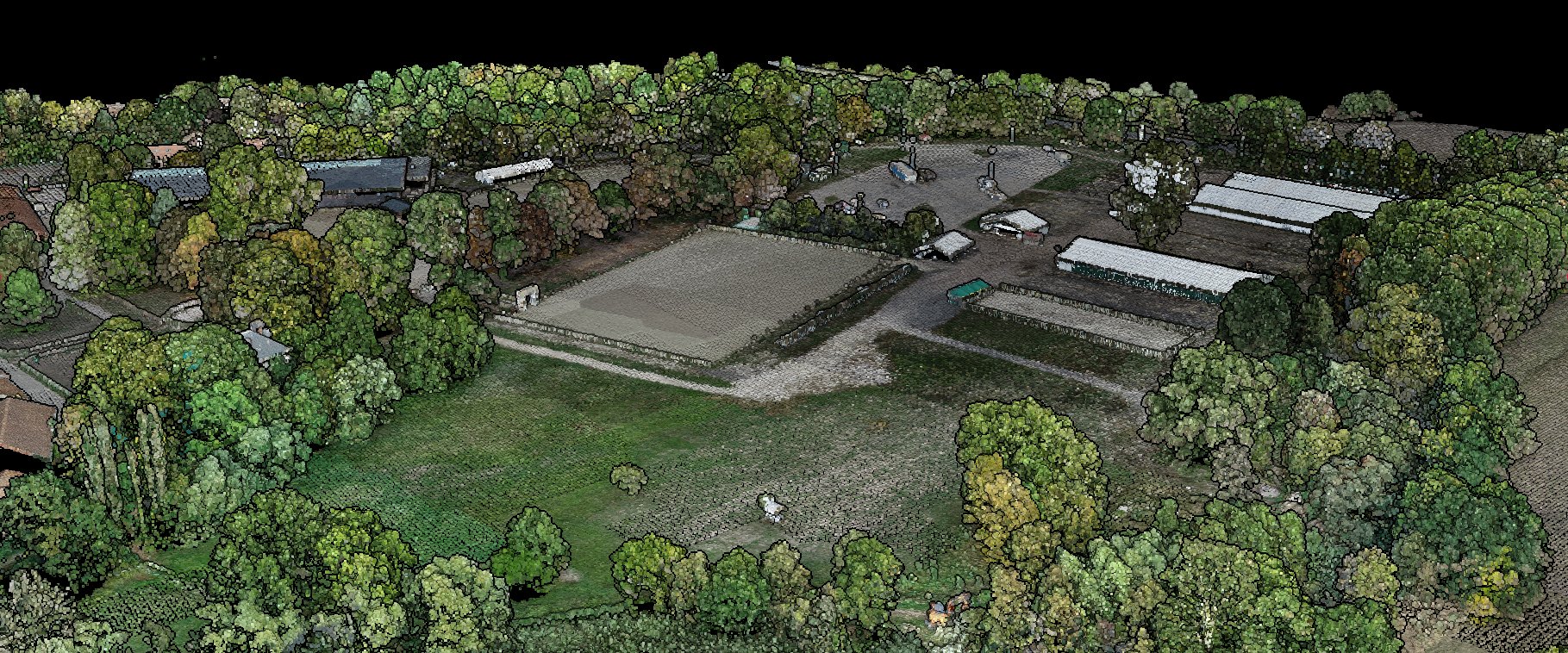
The best photogrammetry software depends on what you photograph. A drone survey has to end in an orthophoto, a terrain model and contours you can defend. A statue has to end in a clean textured model. We compared twelve tools on both jobs, Gaussian splats included, with every price read on the vendor's own site.
Photogrammetry on every plan, Free included • 50 hectares free, no card
The short answer
For drone mapping and surveying, the shortlist is PIX4Dmatic and Agisoft Metashape Professional on a desktop, DJI Terra if you fly DJI, and a cloud service such as Lidarvisor or DroneDeploy if you would rather not run a workstation. WebODM is the free option.
For 3D models of objects and buildings, RealityScan is free for most small firms, 3DF Zephyr has a free edition and a cheap perpetual one, and Meshroom is free and open source.
Lidarvisor is ours, so read its entry with that in mind. Its limits are printed next to its strengths, as for every other tool here. Every price on this page was read on the vendor's own site in October 2026.
The best photogrammetry software, by job
One pick per job. Prices, platforms and limits follow below.
Survey deliverables in a browser: Lidarvisor
Drone photos and LiDAR in one project, control points marked for you, priced by the hectare.
Large survey projects on a desktop: PIX4Dmatic
Drone, mobile and LiDAR data in one project, through to contours and CAD vectors.
A one-off licence: Agisoft Metashape
Perpetual licences from $179, on Windows, macOS and Linux.
DJI drones and DJI LiDAR: DJI Terra
DJI's own software, with no maintenance fees since version 5.0.
Free drone mapping: WebODM
Free and open source orthophotos, elevation models and point clouds.
Construction teams: DroneDeploy
Flight, processing and site maps the whole team opens in a browser.
Detailed 3D models: RealityScan
Photo-real models from objects to whole sites, free under $1 million in yearly revenue.
Free and open source 3D models: Meshroom
A node graph you can open at every step, on Windows or Linux.
Photogrammetry software compared
Prices as published by each vendor in October 2026, excluding taxes. Scroll the table sideways on a phone.
| Software | Runs on | Price | LiDAR too | Gaussian splat | Best for |
|---|---|---|---|---|---|
| Lidarvisor (ours) | Browser, cloud | 1 credit per hectare; Free 50 ha to view; downloads from $19/mo billed yearly | Yes, same project | Yes, in project coordinates, PLY | Survey deliverables without a workstation |
| Pix4D (PIX4Dmatic, PIX4Dcloud) | Windows, macOS; cloud | PIX4Dmatic from $2,290/yr; PIX4Dcloud from $1,290/yr | Yes, PIX4Dmatic | PIX4Dmatic Pro, PIX4Dcloud | Large survey projects |
| Agisoft Metashape | Windows, macOS, Linux | $179 Standard, $3,499 Professional, perpetual | Professional | No | Full control, one-off price |
| DJI Terra | Windows, NVIDIA | $1,850/yr Standard, $3,700/yr Flagship (US) | DJI LiDAR | Flagship | DJI fleets |
| DroneDeploy | Browser, cloud | $4,188/yr individual plan; teams on quote | View preprocessed LAS | Beta, on request, no export | Construction teams |
| WebODM | Windows, macOS, Linux; Lightning cloud | Free; Lightning from $24/mo billed yearly | Not mentioned | Displays splats trained elsewhere | Free drone mapping |
| ArcGIS Drone2Map, Site Scan | Windows; cloud | On quote | Displays LAS | Yes, 3D Tiles | ArcGIS users |
| Bentley iTwin Capture | Windows; cloud | Modeler Flex free; Engine from €4,095/yr | Yes | Yes | Infrastructure reality models |
| 3Dsurvey | Windows, Ubuntu | $225/mo billed yearly | Yes, Scan module | No, by choice | Survey and CAD in one program |
| RealityScan | Windows | Free under $1M revenue; $1,250/seat/yr | Yes | No | Fast, detailed 3D models |
| 3DF Zephyr | Windows | Free (50 photos); Lite €199; full €4,200 | Laser scans, full edition | Yes, since 9.0 | Objects and buildings |
| Meshroom | Windows, Linux, NVIDIA | Free, open source | E57 import | Experimental plugin | Free 3D models |
“LiDAR too” means the program takes a LiDAR point cloud as an input, not only photos. Bentley and 3DF Zephyr show prices in euros.
Drone mapping and surveying software
These tools turn a drone flight into map products: an orthophoto, a surface and a terrain model, a point cloud, often contours and volumes. What separates them is where they run, how they prove accuracy, and how you pay.
1. Lidarvisor (ours): best for survey deliverables from a browser
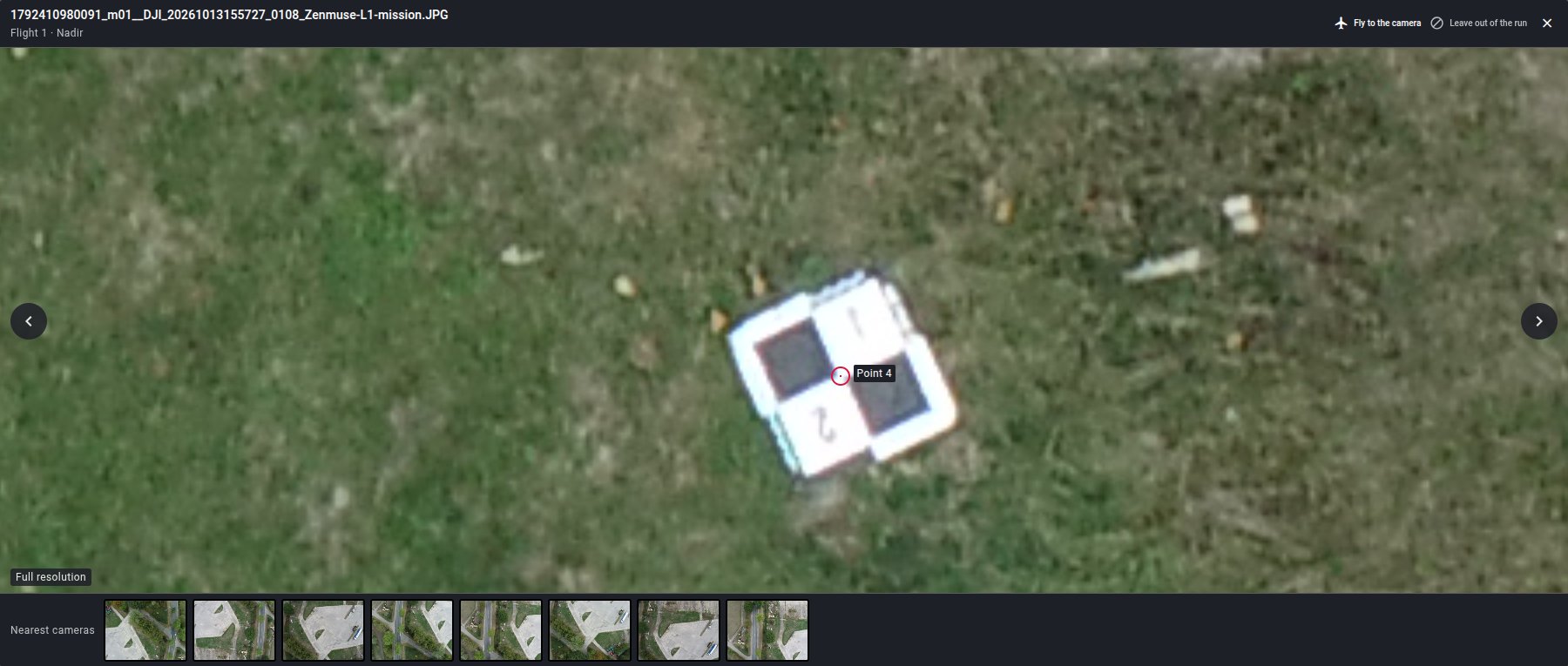
Upload the photo folders of each flight, a LiDAR cloud if you have one and your control point file if you surveyed any, then click Process once. Lidarvisor builds the coloured point cloud and the orthophoto, then runs the same processing it uses on LiDAR: ground and vegetation classification, terrain and surface models, contours, and vectors for CAD and GIS.
Two things set it apart from a desktop package. Your control points are found and marked in the photos for you, with no photo to open. And the report measures accuracy on check points held back from the adjustment, so the figure it prints is an accuracy, not a residual.
A textured 3D mesh and a Gaussian splat are two more boxes to tick on the same run, at no extra credit. See how photogrammetry works in Lidarvisor.
Runs on: any browser, processing in our cloud
Price: 1 credit per hectare on every plan. Free: 50 hectares once, to view and share. Downloads from $19 a month billed yearly (pricing)
Gaussian splat: yes, in your project's coordinates, PLY download
LiDAR: yes, in the same project as the photos
Where it is strong
- Photos and LiDAR in one project, and the orthophoto from your photos feeds road, marking, water and rail extraction.
- Classification, terrain models, contours and vectors on the photo cloud, not only a cloud and an orthophoto.
- Control points marked automatically, then checked against the reconstruction and your survey.
- No GPU, no install, and the same price per hectare whatever you tick.
Where it falls short
- Nothing to tune by hand: no tie point editing and no mesh cleanup in the browser.
- JPEG photos with a GPS position only, and every flight is uploaded when the project is created.
- Downloads need a paid plan, and each plan caps the photos per run, from about 200 on Free to about 5,000 on Advanced.
- Built for sites seen from a drone, not for small objects on a turntable.
2. Pix4D: best for large survey projects on a desktop
PIX4Dmatic is now Pix4D's main desktop engine. It turns aerial and terrestrial captures into point clouds, orthomosaics, DSM and DTM, contours and CAD-ready vectors, and the Standard plan processes drone, mobile and LiDAR data in one project. PIX4Dsurvey was folded into it in January 2026.
The older PIX4Dmapper is ending: no new sales or renewals from January 1, 2027, and support stops on December 1, 2027. PIX4Dcloud is the browser option, with georeferenced Gaussian splats since October 2025.
Runs on: Windows 11, or macOS on Apple M1 or newer; GPU acceleration on NVIDIA only
Price: PIX4Dmatic $2,290, $3,990 or $4,990 a year; PIX4Dcloud $1,290 or $4,490 a year, billed yearly. Free 15-day plan
Gaussian splat: PIX4Dmatic Pro (Windows only) and PIX4Dcloud
LiDAR: yes, in PIX4Dmatic
Where it is strong
- Drone photos, mobile captures and LiDAR in one desktop project.
- Survey outputs all the way to contours and CAD-ready vectors.
- Runs on Mac as well as Windows.
Where it falls short
- Yearly prices from $2,290 add up for occasional jobs, and Pix4D does not offer refunds.
- GPU acceleration and Gaussian splats need Windows and an NVIDIA card.
- PPK corrections have to be done in another program first.
- PIX4Dmapper users have to move to PIX4Dmatic during 2027.
3. Agisoft Metashape: best one-off licence for full control
Metashape is still sold as a perpetual licence, and it runs on Windows, macOS and Linux with NVIDIA or AMD graphics cards.
Pick the edition carefully. Standard ($179) makes point clouds and textured models but has no ground control points and no georeferenced DSM, DTM or orthomosaic. Professional ($3,499) adds all of that, plus point cloud classification, contours, aerial LiDAR support and cloud processing.
Runs on: Windows, macOS, Linux
Price: Standard $179, Professional $3,499, perpetual node-locked licences with 12 months of support. 30-day trial
Gaussian splat: not offered
LiDAR: Professional only
Where it is strong
- Pay once and keep the licence.
- Hands-on control: you can edit the dense cloud yourself.
- Runs on all three desktop systems, with NVIDIA or AMD graphics.
Where it falls short
- Survey features, control points included, are in Professional only.
- You need a strong workstation: 16 to 32 GB of RAM for a basic setup, more for large blocks.
- No Gaussian splats.
4. DJI Terra: best for DJI drones and DJI LiDAR
DJI Terra is DJI's own processing software, built around its drones and Zenmuse LiDAR payloads. It makes orthophotos, DSMs, textured models, point clouds and, on Flagship, Gaussian splats, with control point marking and built-in PPK. There have been no maintenance fees since version 5.0, and Zenmuse L3 LiDAR processing has been free since 5.1.
The catch is the hardware: Windows only, NVIDIA only. The trial lasts a month and stops at 500 photos.
Runs on: Windows with an NVIDIA GPU, 32 GB of RAM minimum
Price: on the US DJI Store, Standard $1,850 a year or $5,280 permanent, Flagship $3,700 a year or $10,580 permanent
Gaussian splat: Flagship, exported as PLY or 3D Tiles
LiDAR: yes, from DJI LiDAR
Where it is strong
- Made by the company that makes the drone and the LiDAR.
- Permanent licences, and no maintenance fees since version 5.0.
- Built-in PPK, plus control and check points.
Where it falls short
- Windows and NVIDIA only.
- Its documentation covers DJI LiDAR sensors only.
- Gaussian splats need the Flagship licence.
5. DroneDeploy: best for construction teams in the cloud
DroneDeploy is a cloud platform for jobsites: a flight app, processing, and maps the whole team opens in a browser. It makes orthomosaics, elevation and terrain models, contours, point clouds and 3D models, with cut and fill and automatic GCP tagging on Aerial Pro. Procore, the construction software company, completed its purchase of DroneDeploy on September 9, 2026.
LiDAR is upload and view: preprocessed LAS files, with no terrain model or volumes computed from them. Gaussian splats are a beta for Aerial Pro, enabled on request, with no export during the beta.
Runs on: browser, plus a flight app for iOS and Android
Price: individual Flight & Analysis plan $4,188 billed annually, up to 3,000 images per map; team plans on quote. 14-day trial
Gaussian splat: beta on Aerial Pro, view only
LiDAR: preprocessed LAS, view only
Where it is strong
- Flight planning, processing and sharing in one place.
- Nothing to install or maintain.
- Made for teams that follow a site week after week.
Where it falls short
- The individual plan is $4,188 a year, and team prices are not published.
- The OBJ model export is not georeferenced.
- No LiDAR processing, only display of preprocessed clouds.
6. WebODM: best free drone mapping software
WebODM is free and open source, with installers for Windows, macOS and Linux. It produces orthophotos, elevation models, point clouds and textured models, with ground control points and, since October 2026, check points. Since April 2026 it is an independent project with its own engine, ODX. The OpenDroneMap project carries on separately with ODM and sells its own Windows installer.
If you would rather not run it yourself, WebODM Lightning is the hosted version, with classification, terrain models, contours and volumes among its outputs. Both display Gaussian splats, but the splat is trained in a separate program and uploaded.
Runs on: Windows, macOS, Linux, 8 GB of RAM at least and 16 GB recommended; Lightning in the cloud
Price: free. Lightning from $24 a month billed yearly, or pay per map with 150 free credits
Gaussian splat: displays splats trained in another program
LiDAR: not mentioned in its documentation
Where it is strong
- Free and open source, on all three desktop systems.
- Ground control points and check points.
- A hosted option for when your computer is not enough.
Where it falls short
- You install, update and size the machine yourself.
- No LiDAR input in its documentation.
- Lightning caps images per map: 1,500 on Pro, 3,000 on Business.
7. ArcGIS Drone2Map and Site Scan: best for ArcGIS users
Esri sells drone processing inside its ArcGIS Reality family. Drone2Map is the Windows desktop app, Site Scan for ArcGIS the cloud platform with fleet management, and ArcGIS Reality Studio and Reality for ArcGIS Pro sit above them. Results land straight in ArcGIS.
Drone2Map 2026.1 merged its two licence levels into a single Reality Mapping licence, so every user gets the former Advanced features: point clouds, meshes and Gaussian splats as 3D Tiles. Site Scan has made splats in the cloud since May 2026, for Custom Subscription accounts and not for customers on EU hosting.
Runs on: Drone2Map on Windows 11, 32 GB of RAM for up to 2,500 images; Site Scan in the cloud
Price: not published, contact sales
Gaussian splat: yes, as 3D Tiles
LiDAR: Drone2Map displays LAS files; Reality Studio can add lidar to the reconstruction
Where it is strong
- Outputs go straight into the ArcGIS system your GIS team already uses.
- Desktop and cloud options from one vendor.
- Gaussian splats on the desktop and in the cloud.
Where it falls short
- No public price.
- Windows only on the desktop, and the deep learning features need an NVIDIA card.
- Site Scan splats depend on your subscription and hosting region.
8. Bentley iTwin Capture Modeler: best for infrastructure reality models
Formerly ContextCapture, iTwin Capture Modeler builds reality meshes, Gaussian splats, point clouds and orthophotos for infrastructure and digital twins. It processes LiDAR as well as photos, and the WorkSuite bundle covers terrain models, contours and volumes.
The pricing model changed. Modeler Flex is a free app to prepare projects, and you pay when you process, either on a licensed iTwin Capture Engine or in Bentley's cloud services.
Runs on: Windows 11, an NVIDIA RTX 3070 at least for the Engine; cloud services
Price: Modeler Flex free; Engine from €4,095 and WorkSuite from €5,115 a year, as shown to a European visitor; cloud on quote
Gaussian splat: yes
LiDAR: yes, LAS, LAZ and other formats
Where it is strong
- Large reality meshes for engineering and digital twins.
- Photos and LiDAR together.
- Start free and pay only when you process.
Where it falls short
- Windows and a high-end NVIDIA card for local processing.
- Cloud processing is priced on quote.
- Built for infrastructure owners rather than one-off survey jobs.
9. 3Dsurvey: best for surveyors who want CAD in the same program
3Dsurvey covers the whole survey job in one window: point clouds, true orthophotos, ground classification, terrain models, volumes, contours, profiles and cross sections, with a CAD engine built in. AprilTag ground targets are detected automatically, and the Scan module merges LiDAR and SLAM clouds with photogrammetry.
It has said openly that it will not add Gaussian splats until they reach measurement-grade accuracy. Version 4.2, out on October 22, 2026, claims processing up to 5 to 10 times faster on large datasets.
Runs on: Windows 11 or Ubuntu 24.04, with an NVIDIA GPU
Price: $225 a month billed yearly ($2,700), $270 month to month, or a perpetual licence. 14-day trial
Gaussian splat: no, by choice
LiDAR: yes, with the Scan module ($120 a month)
Where it is strong
- Survey and CAD work in one program.
- Automatic detection of AprilTag ground targets.
- Runs on Linux as well as Windows.
Where it falls short
- Needs an NVIDIA graphics card.
- LiDAR merging is a paid add-on.
- No Gaussian splats.
3D models of objects and buildings
These are built for a textured model you can turn around and look at from every side, for heritage, VFX, games or reverse engineering. Some also produce orthophotos and terrain models, RealityScan for one, but their strength is the model.
10. RealityScan: best for fast, detailed 3D models
RealityScan is the new name of RealityCapture, Epic Games' photogrammetry software, since June 2025. It builds photo-real models and point clouds from small objects to large environments, and exports orthophotos, DSMs and DTMs too. Version 2.0 added aerial LiDAR, and 2.1 reads classified LAS and LAZ.
The licence is generous: free for students, educators, hobbyists and most non-games companies under $1 million in yearly revenue, and $1,250 per seat per year above that.
Runs on: Windows with an NVIDIA GPU, or AMD since version 2.2; an experimental Linux build for the command line
Price: free under $1 million in yearly revenue; otherwise $1,250 per user per year. 30-day trial
Gaussian splat: not offered; it exports to COLMAP for splat trainers
LiDAR: yes
Where it is strong
- Free for most small firms and individuals.
- Photo-real models from objects to whole environments.
- Combines photos with aerial LiDAR and laser scans.
Where it falls short
- Windows only for the full application; macOS is not among its supported systems.
- No Gaussian splats.
- Needs an NVIDIA or AMD graphics card to build models.
11. 3DF Zephyr: best for objects and buildings, with a free tier
3DF Zephyr, from 3Dflow in Verona, comes in three editions. Free handles up to 50 photos. Lite (€199, perpetual) is the low-cost edition for 3D models. The full edition adds the survey side: control points, orthophotos, terrain models, DXF contours and volumes, plus laser scans registered with the photos.
Version 9.0, released in July 2026, added Gaussian splatting to the full edition and to Lite.
Runs on: Windows 10 and 11; a CUDA card speeds it up, the CPU alone works
Price: Free; Lite €199; full edition €4,200 perpetual or €250 a month, excluding VAT
Gaussian splat: yes, since 9.0
LiDAR: laser scans in the full edition
Where it is strong
- A free edition to learn on and a low-cost perpetual Lite.
- Runs without an NVIDIA card, more slowly.
- Gaussian splats in Lite as well as the full edition.
Where it falls short
- Windows only.
- Survey tools are in the full edition only.
- Free stops at 50 photos.
12. Meshroom: best free, open source 3D models
Meshroom is the desktop app of AliceVision, an open source framework under the MPL-2.0 licence. It turns photos into a textured mesh through a node graph you can open and change at every step, and it is aimed at film, VFX, games, science and cultural heritage.
It is not a mapping tool: no orthophoto, no terrain model, and no documented ground control workflow. Gaussian splats exist only as an experimental plugin that needs a developer setup.
Runs on: Windows or Linux, with an NVIDIA GPU
Price: free
Gaussian splat: experimental plugin
LiDAR: E57 import since version 2025.1
Where it is strong
- Free and open source.
- Every step visible and editable in the node graph.
- Textured meshes from any set of overlapping photos.
Where it falls short
- Needs an NVIDIA card.
- No orthophoto, terrain model or ground control workflow.
- Windows and Linux only.
Also worth knowing
- Propeller is a cloud platform for earthworks, mining and aggregates, sold with its AeroPoints smart ground control targets ($1,000 each). It processes DJI Zenmuse L1 and L2 LiDAR. The platform price is not published.
- SimActive Correlator3D is a Windows suite for large aerial blocks with no image limit, from €295 a month. It has made Gaussian splats since version 11, in April 2026.
- COLMAP is the free research engine behind many pipelines: camera alignment and dense point clouds, no orthophoto. Many Gaussian splat trainers start from its output.
- Polycam and KIRI Engine are phone and web apps for objects and rooms, both with free tiers and Gaussian splats. Polycam also takes drone photos for splats, from 20 to 200 images.
Photogrammetry or Gaussian splatting?
A Gaussian splat turns the same photos into a different kind of 3D. Instead of a surface, it stores millions of small coloured, semi-transparent blobs that the viewer blends into an image. It looks like the photos, including the things a mesh handles badly: glass, foliage, fences, railings, thin wires.
What it does not give you is geometry. You cannot take a contour, a volume or a CAD line off a splat. So the split is simple: photogrammetry for anything you measure, the splat for showing a site to a client, checking it by eye, or walking someone through a place they have never visited.
A splat also depends more on how you flew. From vertical photos only, it looks best from above. Oblique photos are what make it convincing when you orbit a building or drop to street level.
Among the drone tools above, PIX4Dcloud and PIX4Dmatic Pro, DJI Terra Flagship, Drone2Map and Site Scan, iTwin Capture, Correlator3D, 3DF Zephyr and Lidarvisor make splats. DroneDeploy has them as a beta without export, and WebODM displays splats trained in another program. Check the coordinates the splat comes out in: Pix4D documents its PIX4Dcloud splats as georeferenced, while most vendors do not say. In Lidarvisor the splat sits in your project's coordinate system, on the point cloud and the mesh of the same run, and downloads as a PLY.
Dedicated splat tools work from drone photos too. Postshot trains on your own Windows PC with an NVIDIA card, from €17 a month billed yearly for commercial use, and the free SuperSplat editor edits and publishes a splat in the browser.
Photogrammetry or LiDAR?
Photogrammetry measures what the camera sees. Over bare ground, roads and roofs, that is plenty, and the colour comes for free. Under trees it sees the top of the canopy, because no photo sees the ground beneath the leaves, so a terrain model there is a guess.
LiDAR pulses pass through the gaps between leaves, and some of them come back from the ground. That is why firms that map wooded or overgrown sites often fly both, and why Lidarvisor takes photos and LiDAR in the same project.
How to choose photogrammetry software
Six checks, in the order that rules tools out fastest.
Start from the deliverable
A survey ends in an orthophoto, a terrain model, contours and a CAD file. A visual model ends in a textured mesh or a splat. Most tools are built for one of the two.
Decide where it runs
Desktop tools want a strong workstation, often with an NVIDIA graphics card. Cloud tools want a good upload connection instead.
Check how accuracy is proved
Look for ground control points and for check points held back from the adjustment. A residual on a point used in the adjustment is not an accuracy.
Count the photos per job
Licences and plans cap photos or area per project. Check the cap against your largest flight, not your average one.
Look at what comes after
If you need classification, a terrain model under vegetation or contours in DXF, check that the tool makes them, or budget for a second program.
Compare prices the way you work
Perpetual licence, yearly subscription or pay per hectare. Occasional jobs favour paying per job; daily production favours a licence.
Free photogrammetry software
Free is real in this field. Each option comes with a condition.
- WebODM: free and open source drone mapping on Windows, macOS and Linux, with orthophotos, elevation models, point clouds and textured models. It runs on your own machine.
- Meshroom: free, open source 3D models on Windows and Linux. It needs an NVIDIA graphics card and makes no orthophoto or terrain model.
- COLMAP: free camera alignment and dense point clouds under a BSD licence, for researchers and developers.
- RealityScan: free for students, educators, hobbyists and most companies under $1 million in yearly revenue, on Windows.
- 3DF Zephyr Free: up to 50 photos on Windows. Enough to learn on, not for a survey.
- Lidarvisor Free: 50 hectares once, about 200 photos per run, with the same processing as the paid plans. You view and share the results in 3D; downloading them needs a paid plan, from $19 a month billed yearly.
Frequently asked questions
What is the best photogrammetry software?
It depends on the job. For drone mapping and surveying: PIX4Dmatic or Agisoft Metashape Professional on a desktop, DJI Terra if you fly DJI, and a cloud service such as Lidarvisor or DroneDeploy if you would rather not run a workstation. For 3D models of objects and buildings: RealityScan, free for most companies under $1 million in yearly revenue. Free and open source: WebODM for maps, Meshroom for models.
Is there free photogrammetry software?
Yes. WebODM is free and open source for drone maps. Meshroom and COLMAP are free for 3D models. RealityScan is free for most companies under $1 million in yearly revenue, and 3DF Zephyr Free handles up to 50 photos. Lidarvisor's Free plan processes 50 hectares once, to view and share in 3D; downloading needs a paid plan.
How much does Pix4D cost?
Billed yearly and excluding taxes, PIX4Dmatic costs $2,290 (Analyst), $3,990 (Standard) or $4,990 (Pro) a year, PIX4Dcloud $1,290 (Starter) or $4,490 (Pro), and PIX4Dmapper $3,990, as shown on Pix4D's pricing pages in October 2026. There is a free 15-day plan with no credit card.
Is Pix4Dmapper discontinued?
It is on its way out. Pix4D announced in October 2026 that PIX4Dmapper will no longer be sold or renewed from January 1, 2027, and that support ends on December 1, 2027. Licences are converted to PIX4Dmatic Pro.
Which is better, Pix4D or DroneDeploy?
They suit different people. PIX4Dmatic is desktop software for survey teams who want control of the processing on their own workstation. DroneDeploy is a cloud platform built around construction sites and teams, owned by Procore since September 2026. For survey deliverables, Pix4D is the closer fit; for a jobsite team sharing maps every week, DroneDeploy.
What is the best photogrammetry software for Mac?
Agisoft Metashape and PIX4Dmatic both run on macOS, PIX4Dmatic on Apple M1 or newer and without GPU acceleration or Gaussian splats on a Mac. WebODM installs on macOS too, and cloud services such as Lidarvisor or DroneDeploy run in any browser. DJI Terra does not support macOS, and RealityScan, 3DF Zephyr and Meshroom list only Windows, or Windows and Linux.
Can I use my phone for photogrammetry?
For objects and rooms, yes: Polycam, KIRI Engine and RealityScan Mobile build 3D models from phone photos, and Polycam and KIRI Engine make Gaussian splats too. For a site survey, you need overlapping photos with positions, taken from a drone, and mapping software to process them.
Do I need ground control points?
Not to get a map, but you need them to prove its accuracy. Without them, the result is positioned by the drone's own GPS. With them, keep a few aside as check points: accuracy measured on points the adjustment never used is the only figure worth quoting. Lidarvisor holds back about one point in four for you when you mark none as check points.
Is LiDAR better than photogrammetry?
Neither is better everywhere. Photogrammetry gives colour and fine detail on open ground and buildings with a camera drone. LiDAR reaches the ground under vegetation, where photos only see the canopy. Firms that map wooded or overgrown sites often fly both.
What is the difference between photogrammetry and Gaussian splatting?
Photogrammetry builds geometry: a point cloud, a terrain model, a mesh you can measure and bring into CAD. A Gaussian splat is a photo-real 3D view made of millions of small coloured blobs. It shows glass, trees and fences better than a mesh, but you do not measure on it. On a drone survey you usually want both, from the same photos and in the same coordinates.
Do I need a powerful computer for photogrammetry?
For desktop software, yes. PIX4Dmatic, DJI Terra and Drone2Map all list 32 GB of RAM as a minimum, and DJI Terra and Meshroom only run with an NVIDIA graphics card. Cloud services move the processing to their servers, so a laptop and a decent upload are enough.
Related resources
Photogrammetry in Lidarvisor
From drone photos to an orthophoto, a terrain model and contours, control points marked for you.
See how it worksLiDAR vs photogrammetry
When the camera is enough, and when you need a laser to reach the ground.
Read the comparisonGround control points
How control and check points make a drone survey accurate, and how to place them.
Read the guideBest point cloud software
Twelve tools for LiDAR and 3D scans, from free viewers to survey suites.
Read the comparisonTry it on your next flight
Upload the photos of one flight, tick the products you need and click Process once. The control points are marked for you, and the report tells you how accurate the result is.
Create free account50 hectares free, no card. Downloads from $19 a month on Lite, billed yearly.