

Step-by-Step Tutorial
What is OpenTopography?
OpenTopography is a National Science Foundation-funded facility that provides free, centralized access to Earth science-oriented topography data. Hosted at the San Diego Supercomputer Center, it offers both high-resolution point cloud data and global raster DEMs to researchers, educators, and professionals worldwide.
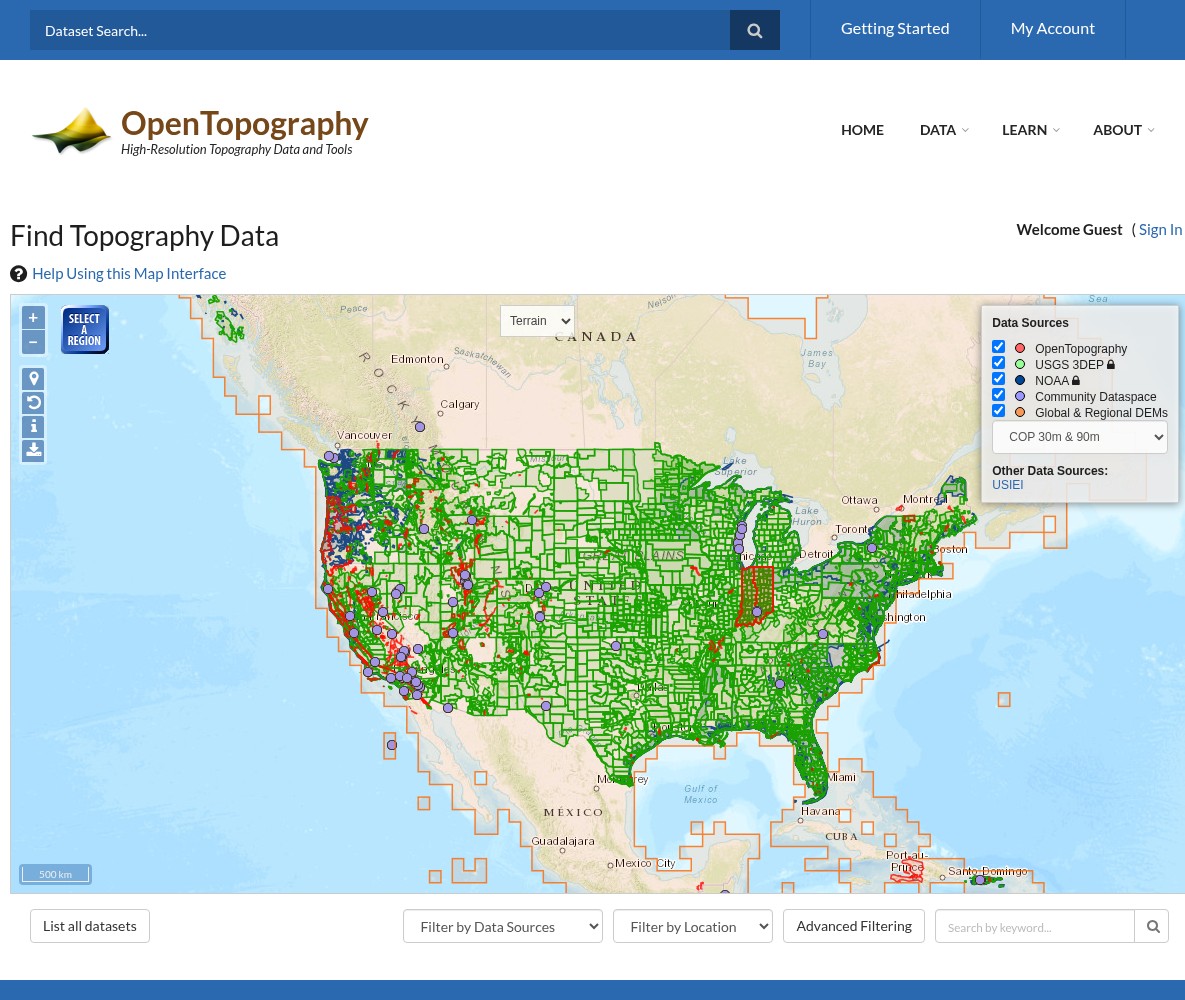
The Find Topography Data portal with interactive map and data source filters
01
Navigate to the Data Portal
Go to portal.opentopography.org/datasets to access the Find Topography Data interface.
Use the map to explore data coverage:
- Red markers = OpenTopography hosted datasets
- Green markers = USGS 3DEP point cloud data
- Purple markers = NOAA Coastal LiDAR
- Blue outlines = Community Dataspace
Use the Data Sources panel on the right to toggle different data types on/off. Click Select Region to draw a search area, or use the dropdown filters below the map.
02
Filter and Find Your Dataset
Use the filtering tools to narrow down results:
Filter by Data Sources:
- Global & Regional DEM (SRTM, Copernicus, etc.)
- OpenTopography (high-resolution hosted data)
- USGS 3DEP (federal LiDAR coverage)
- NOAA Coastal LiDAR
- Community Dataspace
Filter by Location: Select a US state or international country from the dropdown.
Search by Keyword: Type project names, geographic features, or data types to find specific datasets.
Click List all datasets to see a comprehensive table of all available data.
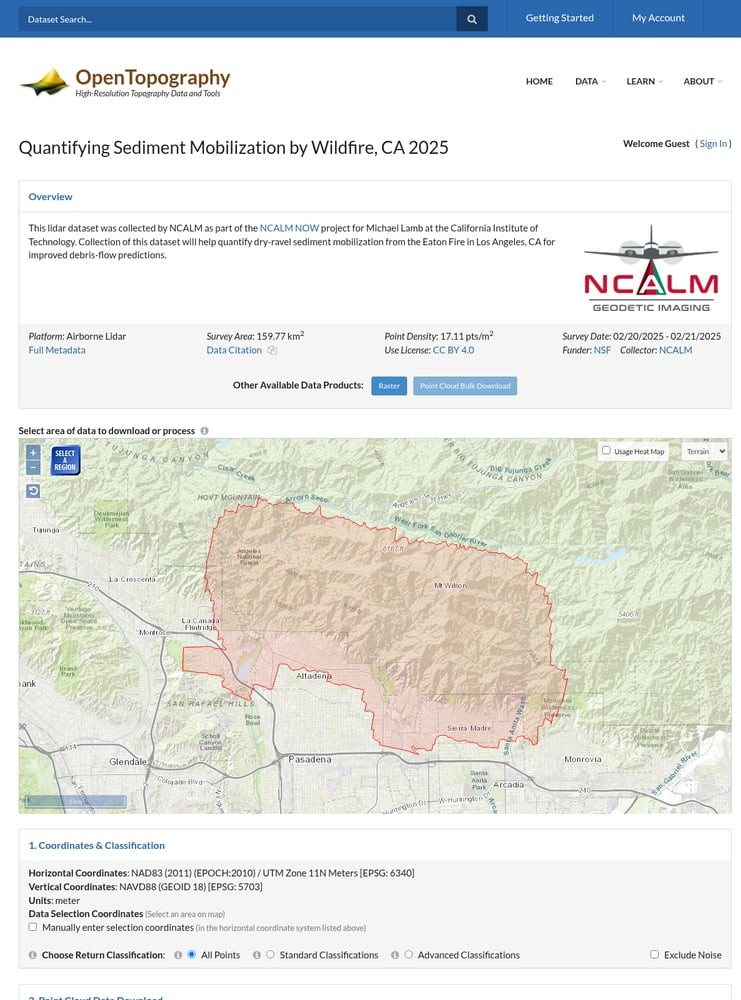
Dataset detail page with area selection map and download options
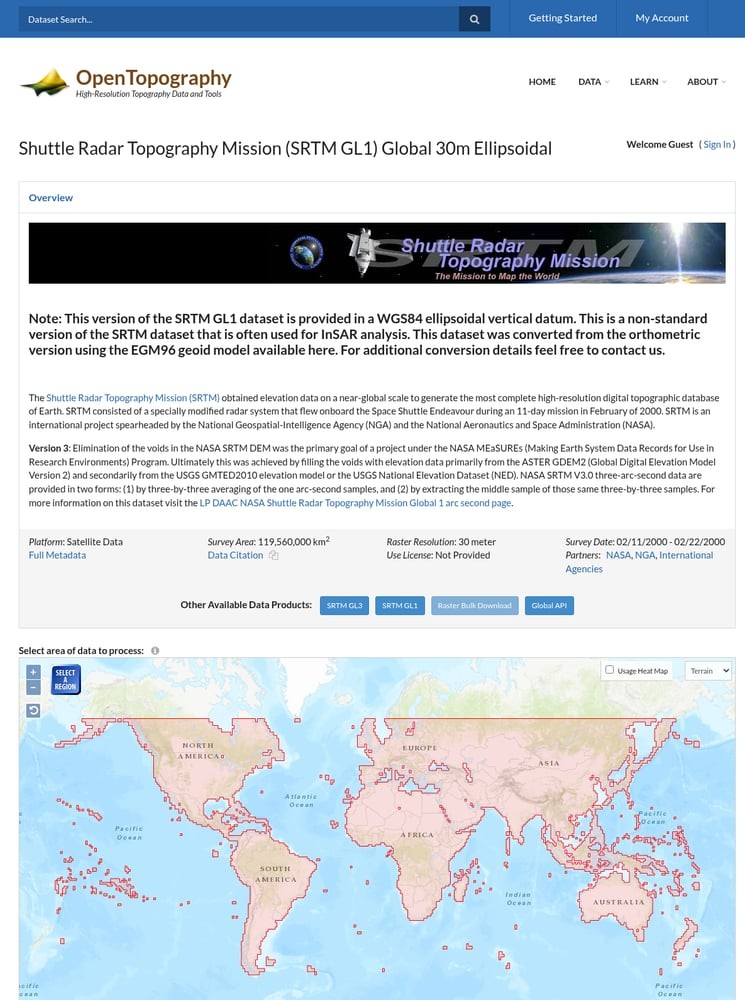
Global DEM interface showing SRTM worldwide coverage
03
Select Your Area of Interest
Once you’ve chosen a dataset, use the interactive map to define your area of interest:
For Point Cloud Data:
- Click and drag to draw a rectangle on the map
- Or manually enter coordinates using the checkbox option
- Select classification filters (All Points, Ground Only, etc.)
For Global DEMs (SRTM, Copernicus, etc.):
- Use the Select Region tool to draw your area
- Maximum area limits apply (varies by dataset)
- Choose output format: GeoTIFF, Arc ASCII, or ERDAS IMAGINE
The map shows the exact coverage boundary of the dataset in red outline.
04
Configure Processing Options
OpenTopography offers powerful on-the-fly processing. Configure your output:
Point Cloud Downloads:
- Download raw LAZ files (compressed point cloud format)
- Generate custom DEMs using TIN interpolation
- Set grid resolution (default 1 meter)
- Create 3D point cloud visualizations
Raster Visualizations:
- Hillshade rendering
- Color relief maps
- Slope and aspect analysis
- Surface roughness
Advanced Services (requires free account): Ground classification, vegetation analysis, and more.
📋 Processing Options Overview
Core Services (no account needed):
✓ Point cloud download (LAZ)
✓ Custom DEM generation
✓ Raster visualizations
Advanced Services (free account):
✓ Point classification
✓ Canopy height models
✓ Hydrological analysis
⬇️ Download Process
1. Select your area on the map
2. Choose classification & format
3. Click Submit
4. Job processes on server
5. Download link via email (if registered) or displayed on page
05
Submit and Download Your Data
Click the Submit button to start processing your request.
Processing Time:
- Small areas: Usually under 1 minute
- Large areas with DEMs: 2-10 minutes
- Bulk downloads: May take longer
After submission:
- Guest users see results directly on the page
- Registered users get email notifications
- All jobs are saved in your myOpenTopo dashboard
Pro Tip: Create a free account to save your processing jobs, access bulk downloads, and use advanced services.
Available File Formats
OpenTopography provides data in standard geospatial formats compatible with all major GIS and point cloud software.
| Format | Type | Best For |
|---|---|---|
| LAZ | Point Cloud | Compressed LiDAR data; standard for archival and analysis |
| LAS | Point Cloud | Uncompressed format; legacy software compatibility |
| GeoTIFF | Raster DEM | GIS analysis, mapping applications, QGIS/ArcGIS |
| Arc ASCII | Raster DEM | Text-based format; easy to read and convert |
| ERDAS IMAGINE | Raster DEM | ERDAS software suite; remote sensing workflows |
Tips for Large Downloads
💾 Create a Free Account
Register at OpenTopography to access bulk download tools, save your jobs, and get email notifications when large downloads are ready.
📦 Use Tile Indexes for Programmatic Access
OpenTopography provides tile index files for automated workflows. Use these with PDAL or other tools to download specific tiles programmatically.
🔑 Request an API Key
For automated access to Global DEMs, request a free API key. This allows direct download via REST API without manual interaction.
⚡ Process in Smaller Chunks
For very large areas, divide your region into smaller tiles. This speeds up processing and makes downloads more manageable.
Process Your OpenTopography Data in Lidarvisor
Downloaded your LiDAR data from OpenTopography? Take it to the next level with cloud-based processing.
With Lidarvisor, you can:
✦ Upload LAZ/LAS files directly to the cloud
✦ Automatically classify ground, vegetation, buildings, and water
✦ Generate DTMs, DSMs, and contour lines
✦ Export to CAD-ready formats (DXF, SHP)
✦ Process large datasets without hardware limitations
Frequently Asked Questions
Yes! All data on OpenTopography is freely available for download. Most datasets are released under Creative Commons (CC BY 4.0) or similar open licenses. You simply need to cite OpenTopography and the original data source in any publications or products.
No account is required for basic downloads and processing. However, creating a free account gives you access to bulk download tools, advanced processing services (like ground classification), job history tracking, and email notifications for large downloads.
LAZ/LAS point cloud files work with CloudCompare, QGIS, LAStools, PDAL, ArcGIS Pro, Global Mapper, and Lidarvisor. GeoTIFF raster files are compatible with virtually any GIS software including QGIS, ArcGIS, GRASS, and GDAL-based tools.
OpenTopography hosts its own collection of research-focused LiDAR datasets AND provides federated access to USGS 3DEP data. Through OpenTopography, you can access 3DEP point clouds with on-the-fly processing, whereas the USGS sites may only offer pre-generated DEMs. OpenTopography adds value through unified search and processing tools.
Each dataset has a specific citation available on its metadata page. Generally, cite both OpenTopography as the platform and the original data collectors/funders. For example: “Data provided by OpenTopography (https://opentopography.org). [Dataset Name], collected by [Collector], funded by [Funder], DOI: [DOI].”
Limits vary by dataset type. For Global DEMs like SRTM, there’s typically a 4°×4° area limit per request. For hosted LiDAR datasets, limits depend on point density and area. If you need very large areas, use the bulk download tools (requires account) or download data in tiles using the programmatic API.
More Free LiDAR Data Tutorials
Explore our complete collection of free LiDAR data download tutorials: