

When working with LiDAR data or aerial surveys, you’ll encounter two essential elevation products: the Digital Terrain Model (DTM) and the Digital Surface Model (DSM). Understanding the differences is crucial for choosing the right data for your project.
What is a Digital Terrain Model (DTM)?
A Digital Terrain Model (DTM) represents the bare ground surface with all vegetation, buildings, and other objects removed. Think of it as what the earth would look like if you stripped away every tree, building, car, and structure, revealing only the natural topography beneath.
DTMs are created by filtering LiDAR point clouds to isolate only ground-classified points. Advanced classification algorithms identify which laser returns came from the actual ground versus objects above it.
→ Read our complete DTM guide for step-by-step creation instructions.
DTM Applications
- Hydrology and flood modeling — Water flows over the ground surface, so DTMs provide accurate drainage analysis
- Slope and terrain analysis — Calculate true ground gradients for construction or agriculture
- Contour line generation — Create topographic maps showing actual ground elevation
- Earthwork calculations — Determine cut/fill volumes for construction projects
- Archaeological surveys — Reveal hidden ground features beneath vegetation
What is a Digital Surface Model (DSM)?
A Digital Surface Model (DSM) captures the elevation of everything visible from above, including the tops of buildings, tree canopies, power lines, and vehicles. It represents the first surface that a LiDAR pulse or satellite sensor would encounter.
DSMs use the highest elevation points at each location, showing what a drone or aircraft would “see” when looking down at the landscape.
→ Explore our comprehensive DSM guide for detailed applications and workflows.
DSM Applications
- Urban planning and 3D city models — Visualize building heights and urban density
- Line-of-sight analysis — Determine visibility between points considering obstructions
- Solar potential assessment — Calculate shadow patterns from buildings and trees
- Telecommunications planning — Identify antenna placement and signal propagation
- Vegetation height mapping — Measure canopy height when combined with DTM
Visual Comparison: DTM vs DSM
Imagine a cross-section through a landscape with a house and a tree:
- DSM line: Follows the top of the tree canopy, jumps up over the building roof, then follows any other elevated features
- DTM line: Follows only the ground surface, passing underneath the tree and building as if they weren’t there
The vertical difference between DSM and DTM at any point gives you the height of objects above the ground. This is the basis for creating Canopy Height Models (CHM) used in forestry.
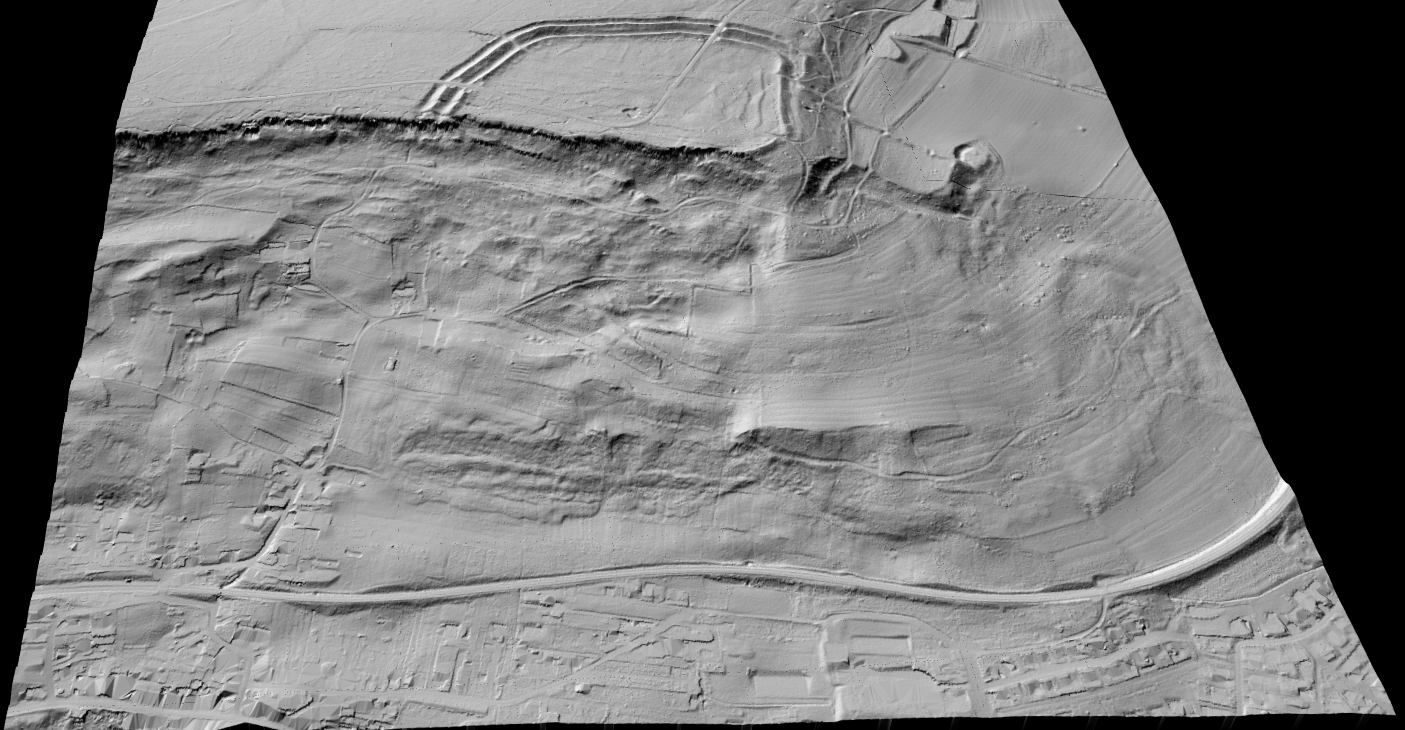
DTM (Digital Terrain Model)
Bare ground surface — vegetation and buildings removed
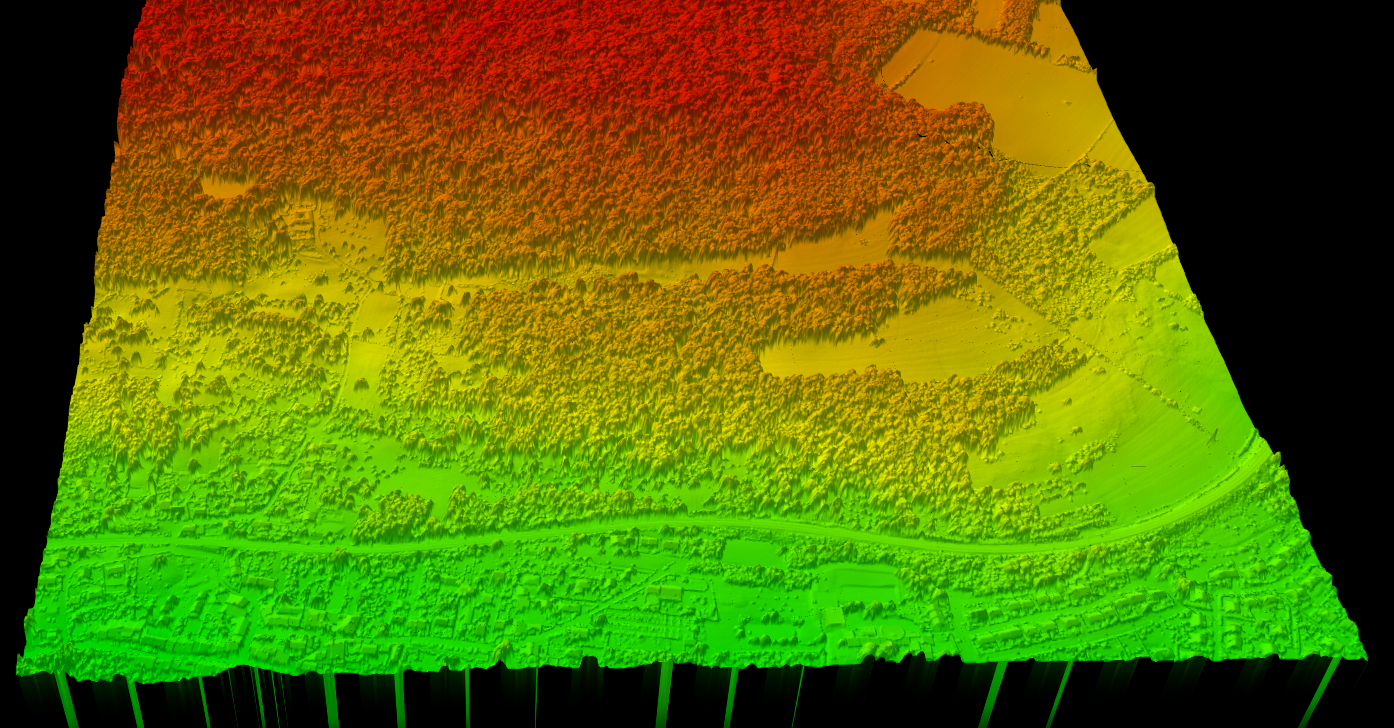
DSM (Digital Surface Model)
All surface features including trees and buildings
DTM vs DSM vs DEM: What’s the Difference?
You’ll often see these three terms used interchangeably, which causes confusion. Here’s how they relate:
Pro tip: When someone says “DEM” without specifying, ask whether they mean bare earth (DTM) or surface (DSM).
Creating DTM from LiDAR
- Point cloud classification — Identify ground points vs. non-ground points
- Ground filtering — Extract only ground-classified points
- Interpolation — Create a continuous raster surface from the ground points
- Export — Output as GeoTIFF or other raster format
Creating DSM from LiDAR
- First return filtering — Select the highest (first) return at each location
- Interpolation — Create a continuous raster surface from these points
- Export — Output as GeoTIFF or other raster format
The key difference: DTMs require accurate point cloud classification to separate ground from non-ground, while DSMs simply take the highest point regardless of classification.
Trusted by Surveyors Worldwide
2,500+ Point Clouds Processed Monthly
“Finally a tool that generates accurate DTMs without hours of manual classification. The AI just works.”
— Marcus T., Land Surveyor
“We switched from desktop software to Lidarvisor. Processing DTM/DSM went from 2 hours to 15 minutes.”
— Elena K., GIS Analyst
“The automatic CHM calculation saved us weeks on our forestry inventory project. Highly recommended.”
— James P., Forestry Consultant
Generate DTM and DSM with Lidarvisor
Lidarvisor automatically generates both DTM and DSM from your aerial LiDAR point clouds. The AI-powered classification engine accurately separates ground points from vegetation, buildings, and other objects, ensuring your DTM represents true bare-earth elevation.
Common Questions
Not accurately. Since DSM includes surface objects, you cannot reliably remove them to create a DTM without the original point cloud data. You need the classified point cloud to properly separate ground from non-ground returns.
DSM accuracy depends on the sensor resolution, while DTM accuracy also depends on the quality of ground classification. Both can achieve centimeter-level accuracy with high-quality LiDAR data and proper processing.
Typical resolutions range from 0.5m to 5m depending on the application. Urban analysis often requires 0.5-1m resolution, while regional terrain analysis may use 2-5m. Higher resolution requires denser point cloud data.
Ready to Generate DTM and DSM?
Upload your point cloud and receive both DTM and DSM outputs automatically, along with hillshade, slope maps, and contour lines. No software installation required.