

Tired of expensive licenses and steep learning curves? We compared 8 leading LiDAR processing tools so you don’t have to. Spoiler: you can start processing point clouds for free in the next 5 minutes.
Best LiDAR Processing Software: Find Your Perfect Match in Minutes
What Makes Good LiDAR Processing Software?
LiDAR processing software transforms raw point clouds into usable deliverables. The best solutions handle four core functions:
Your ideal software depends on project volume, technical expertise, and budget. Here’s how the options stack up.
Software Comparison at a Glance
| Software | Type | Best For | Starting Price |
|---|---|---|---|
| Lidarvisor ⭐ | Cloud | Fast turnaround, no learning curve | Free (10 ha) |
| LP360 | Desktop | ArcGIS users only | Contact vendor |
| TerraScan | Desktop | Large production teams | ~$5,000+ |
| LiDAR360 | Desktop | Forestry specialists | Contact vendor |
| Global Mapper Pro | Desktop | GIS generalists | ~$1,750 |
| CloudCompare | Open Source | Manual work, learning | Free |
| LAStools | Open Source | Command-line experts | Free/Licensed |
| Flai | Cloud | Enterprise volumes | Usage-based |
Don’t want to read the whole guide? Lidarvisor delivers classified point clouds and terrain products in minutes. No software to install, no parameters to configure, no learning curve.
Cloud-Based Solutions
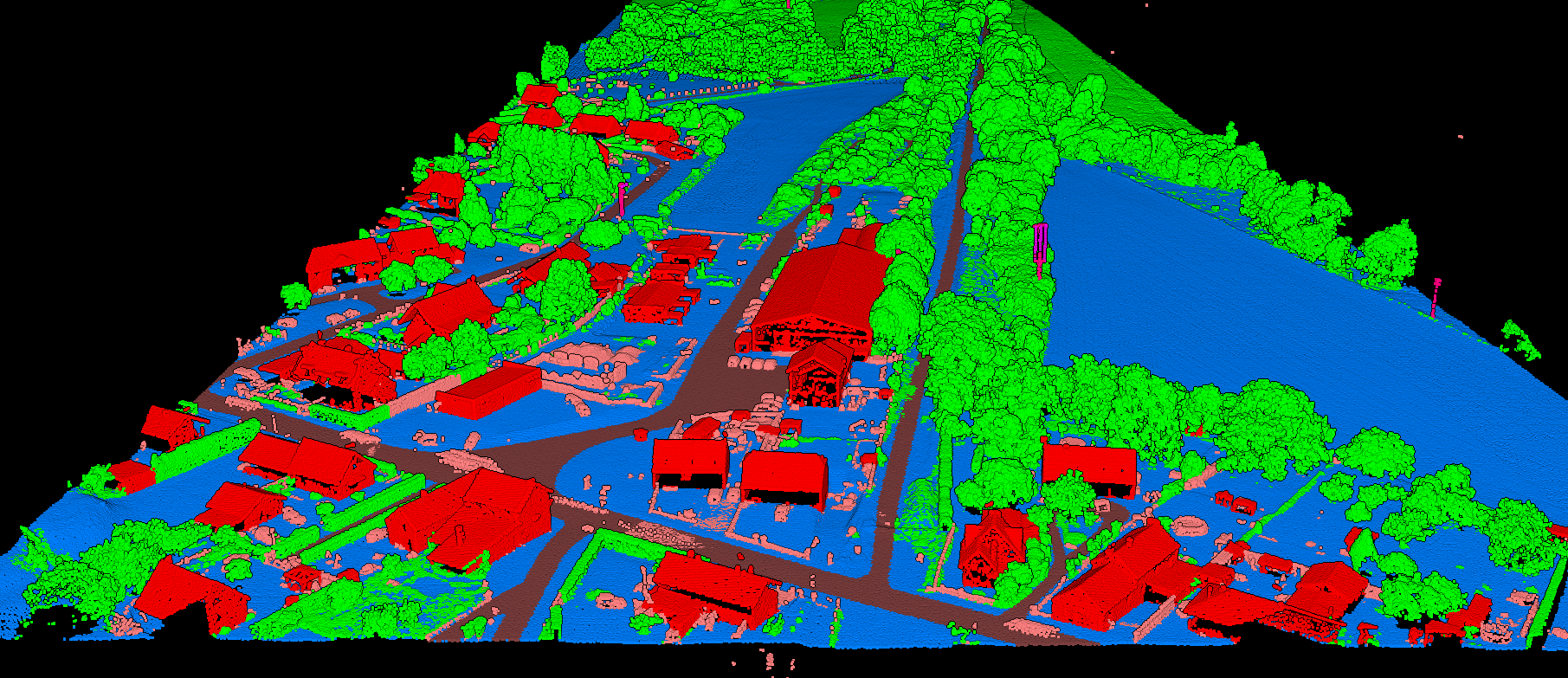
Lidarvisor automatically classifies point clouds into 12 classes
Lidarvisor (Our Top Pick)
Lidarvisor eliminates the complexity of LiDAR processing. Upload your LAS/LAZ file and receive classified data plus terrain products in minutes, not hours. No parameter tuning. No specialized training. No software to install.
Key Features:
- AI-powered classification (12 classes including ground, vegetation, buildings, wires, poles)
- Automatic DTM, DSM, hillshade, and slope map generation
- Vector extraction: contours, building footprints, tree crowns, power lines
- Carbon estimation: per-tree carbon stock and CO₂ equivalent from tree heights
- CAD-ready DXF export with organized layers
- Browser-based 3D viewer with shareable links
Pricing
- Free tier: 10 hectares, no credit card required
- Premium: $89/month for 100 ha
- Advanced: $249/month for 500 ha
- Additional credits from $0.99/ha
Best For
Surveyors needing quick turnaround, teams without dedicated LiDAR specialists, anyone who values their time over manual processing.
Why Lidarvisor wins: While competitors require weeks of training and thousands in licensing, Lidarvisor delivers production-ready deliverables in minutes. Upload, process, download. Done.
Flai
Flai offers AI-driven point cloud classification with pre-trained and custom models. Primarily targets enterprise customers with high-volume needs.
Pricing: Usage-based subscription (no free tier)
Best For: Large organizations with dedicated budgets and consistent, high-volume data pipelines.
Limitation: No free tier to test before committing.
Desktop Software
Desktop tools offer powerful features but require significant upfront investment in software, hardware, and training time.
Open Source Options
Free to download, but your time has value. Manual processing hours add up quickly.
How to Choose the Right Software
By Project Volume
- Any volume: Lidarvisor scales from one-off projects to hundreds per month
- Enterprise volumes with custom needs: TerraScan or Flai
- Occasional projects: Global Mapper if you already own it
By Budget
- $0 to start: Lidarvisor (10 ha free, then $89/mo)
- Free but manual: CloudCompare, LAStools
- $1,500-2,000: Global Mapper Pro
- $5,000-10,000+: TerraScan, LP360, LiDAR360
Why Cloud Processing Wins
A TerraScan setup costs $6,000+ upfront plus annual maintenance, training time, and hardware upgrades. Lidarvisor costs $0 to start and you can process your first project today.
Desktop software made sense when cloud processing didn’t exist. Now? Most teams get faster ROI, lower risk, and better results with cloud-based automation.
Ready to Process Your First Point Cloud?
Stop comparing. Start processing. Lidarvisor gives you 10 hectares free with no credit card required. Upload your LAS file and receive classified point cloud, DTM, DSM, contours, and building footprints in minutes.