
UAV LIDAR PROCESSING
Drone LiDAR Processing: From UAV Flight to Deliverables in Minutes
Drone LiDAR gives you dense, high-detail point clouds.
No credit card required • 50 hectares included
The bottleneck starts after the flight, when cleanup, classification, and export work turn a short mission into a long desktop workflow.
This page shows how to process UAV LiDAR faster and get terrain, classification, and deliverable outputs without wrestling with manual parameters.
Dense Point Clouds
Capture high-detail terrain and structure geometry from low-altitude flights
Vegetation Penetration
Separate ground from canopy and clutter where imagery-only workflows struggle
Multi-Output Workflow
Generate classification, terrain models, and vector deliverables from one dataset
Browser-Based Processing
Upload LAS or LAZ and skip the desktop-tool chain for standard workflows
What Makes Drone LiDAR Different?
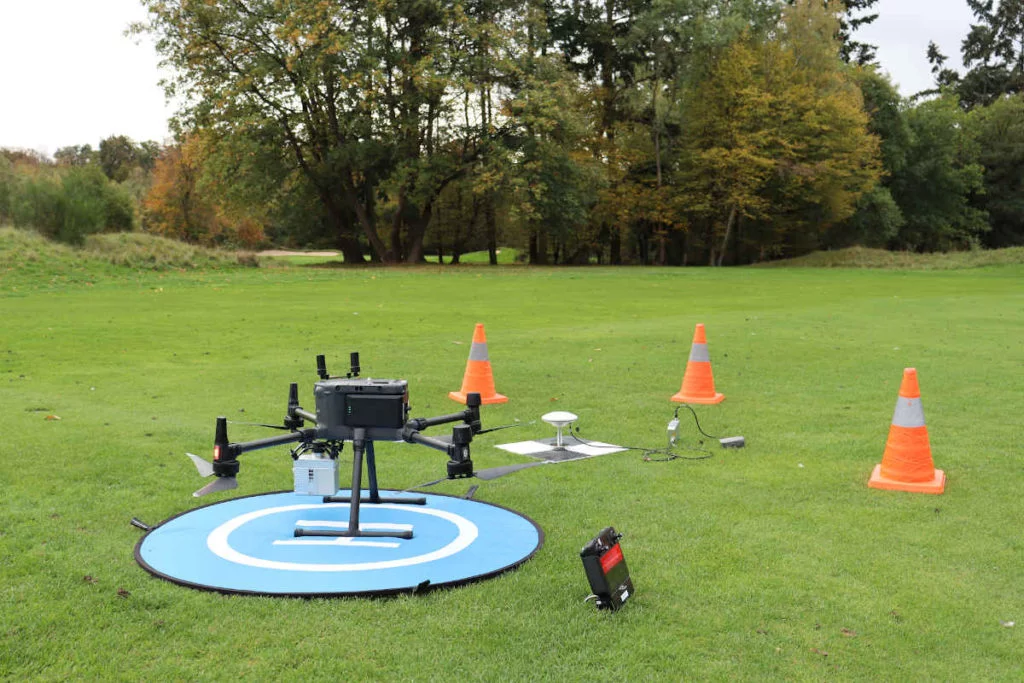
Unlike airborne LiDAR collected from manned aircraft, drone LiDAR flies lower and slower. That gives you much higher point density and better local detail, but it also means you often work with project-based datasets that need fast turnaround for survey, construction, forestry, and corridor jobs.
In practice, UAV LiDAR stands out for four reasons:
- Higher point density for fine terrain and small-object detail
- Better access to constrained sites where crew mobilization matters
- More repeatable short-interval surveys for ongoing site monitoring
- Stronger terrain visibility than photogrammetry in vegetation-heavy areas
Popular Drone LiDAR Sensors
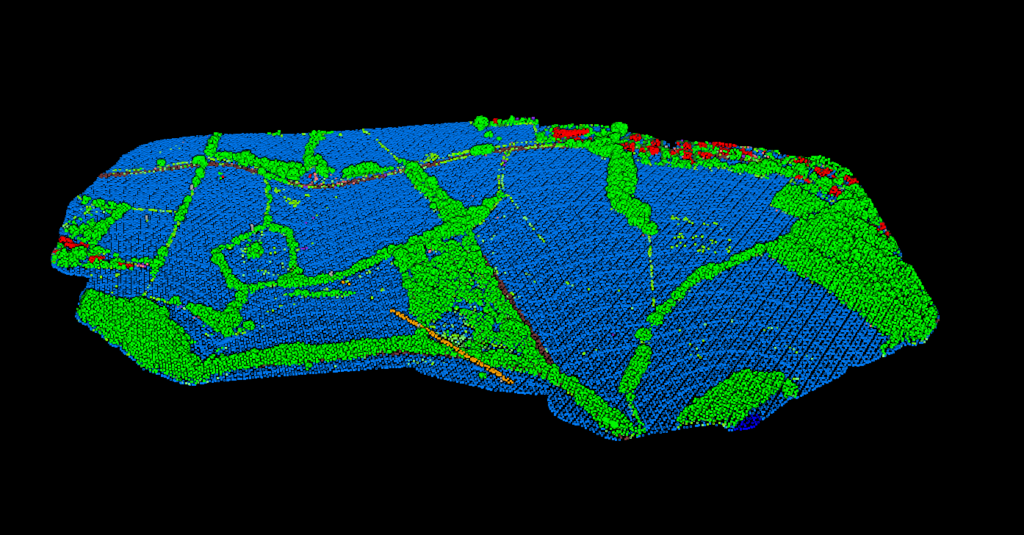
The sensor brand matters less than the workflow discipline after acquisition. Most operators still need to clean, classify, and turn the point cloud into usable outputs before the data helps anyone downstream.
Popular drone LiDAR systems include DJI Zenmuse L1 and L2, RIEGL miniVUX units, Livox-based systems, and YellowScan or Phoenix LiDAR payloads. They all produce standard LAS or LAZ point clouds that still need processing, classification, and export preparation.
- High-density data reveals subtle grade changes and small structures
- Standard LAS or LAZ outputs keep the workflow compatible with downstream tools
- Processing speed matters more when surveys are short but repeated often
A practical UAV LiDAR workflow is short on paper and slow in execution when every step is manual. Here is the path from flight data to usable deliverables.
USE CASES
The Drone LiDAR Processing Workflow
PPK correction
Combine trajectory data and base-station GNSS to georeference the flight and produce a corrected LAS or LAZ point cloud.
Clean the point cloud
Remove outliers, filter obvious noise, and check whether temporary objects or edge artifacts need attention before classification.
Classify returns
Separate ground, vegetation, buildings, wires, poles, water, and other classes so the dataset becomes useful for actual analysis and export.
Export deliverables
Generate the terrain, vector, and classified outputs needed for survey, mapping, forestry, construction, or corridor workflows.
Common Drone LiDAR Use Cases
High-detail UAV LiDAR is most valuable where vegetation, terrain detail, or fast repeat surveys matter
Construction Sites
Site grading checks, earthwork volumes, and repeat progress surveys with terrain detail.
Corridor Mapping
Roads, rail, and utility corridors where vegetation penetration and wire context matter.
Forestry
Canopy work, ground visibility, and terrain-aware analysis where imagery alone falls short.
Topographic Mapping
Dense local surveys for contours, terrain modeling, and CAD-ready deliverables.
Processing Drone LiDAR with Lidarvisor
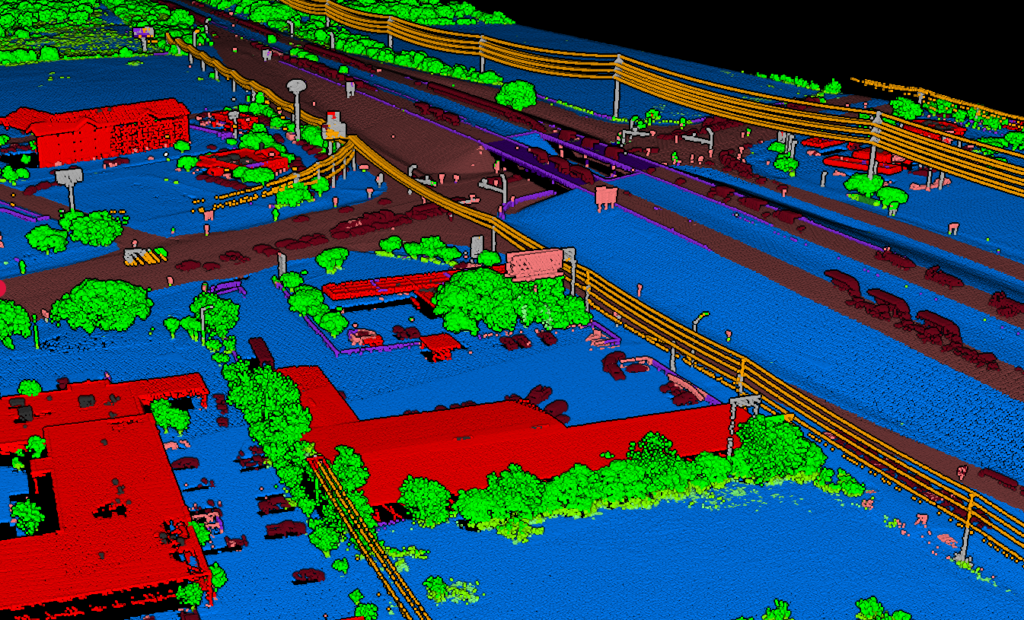
Lidarvisor is built for operators who want usable outputs without spending their day inside manual classification and export tools.
Upload LAS or LAZ from your UAV workflow, classify the point cloud automatically, then generate the terrain and mapping outputs your downstream work actually depends on.
- No desktop software installation for the standard browser-based workflow
- Automatic classification across key LiDAR classes without manual filter tuning
- Export terrain and mapping deliverables from the same processed dataset
- Support for large multi-flight projects, with LAS files up to 250 GB on the Advanced plan
Drone LiDAR vs. Photogrammetry
Both technologies are useful. The right choice depends on whether you need true ground visibility, dense terrain data, or textured visual models.
The software does not have to decide it for you: Lidarvisor processes drone LiDAR and drone photos, separately or in the same project. See photogrammetry.
Photogrammetry
- Surface-only data, with no true vegetation penetration
- More dependent on lighting, texture, and visual overlap quality
- Better for RGB-rich visual context than for bare-earth extraction
- Weaker when ground modeling under canopy is the requirement
Drone LiDAR
- Penetrates vegetation and captures ground under canopy better than imagery-only workflows
- Works without dependence on visible texture and ideal lighting conditions
- Strong fit for terrain, corridor, and classification-heavy projects
- Better when bare-earth outputs are the real goal
Frequently Asked Questions
How is drone LiDAR processing different from airborne LiDAR processing?
The core steps are similar, but UAV datasets are typically smaller, denser, and more project-specific. That changes turnaround expectations and makes fast classification and export workflows more important on a per-site basis.
Can drone LiDAR see the ground under trees?
Often yes, and that is one of its biggest advantages over photogrammetry. LiDAR can capture returns from multiple heights, which helps build a better ground model in vegetated areas.
What file formats do drone LiDAR systems produce?
Most UAV LiDAR workflows deliver standard LAS or LAZ point clouds after georeferencing. From there, you can classify the cloud and export terrain or mapping deliverables for downstream use.
What can I export after processing drone LiDAR in Lidarvisor?
You can generate classified point clouds, terrain outputs such as DTM-derived products, and vector deliverables depending on the workflow. The goal is to move from raw UAV data to usable mapping outputs without rebuilding the process in multiple tools.
Is drone LiDAR always better than photogrammetry?
No. Photogrammetry is often better when high-quality RGB texture is the priority and ground visibility is not blocked by vegetation. Drone LiDAR is stronger when you need terrain, classification, or canopy penetration.
Stop Wrestling with Classification Parameters
Your drone collected the data quickly. The processing should not take the rest of the day.
Start with 5 GB of storage and process up to 50 hectares free, with no credit card required.
No credit card required • 5 GB included on free signup
Related Articles
Drone Workflows
• LiDAR Drones Guide
• Point Cloud Viewer
Processing
• Aerial LiDAR Classification
• Create Accurate Terrain Models