
Learn LiDAR
Best Land Surveying Software for Topographic Surveys: 8 Tools for LiDAR, DTM, and CAD Deliverables
Compare terrain-processing tools for LiDAR, contours, and CAD-ready deliverables
No credit card required • 50 hectares included
Manual ground cleanup, contour generation, and CAD handoff can turn a LiDAR survey into a multi-day office job. The best land surveying software shortens that path from LAS or LAZ upload to DTM, contours, and CAD-ready deliverables.
If you already have capture hardware and final drafting tools, the real bottleneck is usually the processing layer. This guide compares eight land surveying software options for topographic surveys and shows where Lidarvisor fits when you need classified point clouds, terrain models, and export-ready outputs fast.
Best Land Surveying Software for LiDAR-Driven Workflows
Choose based on where your bottleneck sits: point-cloud classification, terrain extraction, or final CAD-ready handoff
| Tool | Best for | Strength | Watch-out |
|---|---|---|---|
| Lidarvisor | Fast cloud processing for survey deliverables | Automatic classification, DTM, contours, DXF exports | Focused on processing rather than full CAD drafting |
| Carlson Point Cloud | CAD-centric survey offices | Strong Carlson ecosystem integration | Desktop workflow and higher setup overhead |
| Global Mapper Pro | Mixed GIS and terrain analysis work | Broad format support and terrain tools | Can require more manual setup |
| LP360 | Advanced LiDAR production teams | Deep point cloud tooling | Steeper learning curve |
| LiDAR360 | Forestry and advanced analysis workflows | Specialized extraction modules | More complexity than many survey teams need |
| Civil 3D | Design-stage drafting and corridors | Strong downstream engineering workflow | Not purpose-built for automated point classification |
| MicroStation / OpenRoads | Large infrastructure projects | Enterprise design environment | Heavy stack for simple topo processing |
| QGIS + plugins | Budget-sensitive GIS teams | Low cost and flexible GIS analysis | Fragmented workflow for survey-grade LiDAR processing |
What Surveyors Actually Need From Land Surveying Software
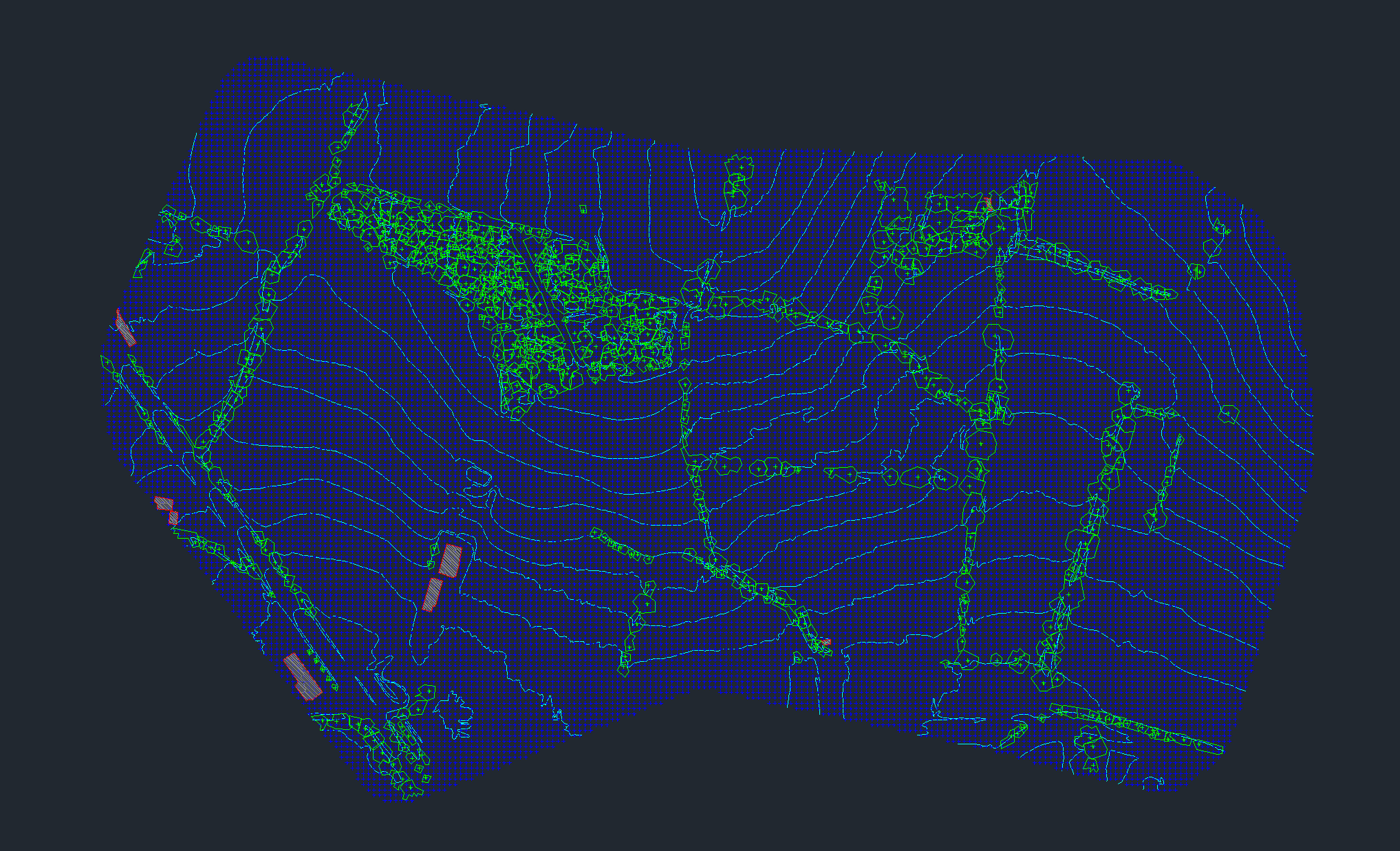
- Ground classification to separate bare earth from vegetation, buildings, vehicles, and temporary objects
- DTM and DSM generation for terrain modeling and elevation comparison
- Contour extraction for topographic map production
- CAD exports such as DXF for downstream drafting
- GIS-friendly raster outputs such as GeoTIFF for mapping and analysis
- Fast turnaround for survey deliverables, not just raw visualization
Topographic Survey Software vs Land Surveying Software
People often use these terms interchangeably, but the intent is slightly different. Land surveying software usually implies a broader office workflow that includes drafting, surface creation, and deliverable prep. Topographic survey software is more tightly tied to terrain extraction, contours, spot elevations, and existing-ground modeling.
That distinction matters for Lidarvisor. It is strongest in the part of the workflow where point clouds become survey-ready terrain outputs: classified ground, DTM, hillshade, slope maps, gridded points, contour lines, and exportable vectors.
How Buyers Evaluate Topographic Survey Software
- Input coverage: can the software start from standard LiDAR deliverables like LAS or LAZ without a long conversion chain?
- Ground-to-deliverable speed: how quickly can the team move from classification into DTM, contours, and DXF exports?
- Office fit: does it plug into CAD and GIS handoff workflows instead of forcing a complete stack replacement?
- Training load: can junior analysts or distributed subcontractors run the workflow reliably?
- Project types: does it support boundary surveys, existing conditions, corridor mapping, and earthworks review?
WORKFLOW
Where Lidarvisor Fits in a Survey Workflow
The processing layer is where raw point clouds become survey-ready terrain outputs and exportable deliverables
| Workflow stage | What happens | Where Lidarvisor helps |
|---|---|---|
| 1. Data capture | Drone or airborne LiDAR collection, GNSS/IMU processing | Not the capture tool, but prepares the point cloud for downstream survey work |
| 2. Point cloud processing | Classification, filtering, terrain extraction | Core fit: automatic class separation, DTM and DSM generation, contour-ready terrain outputs |
| 3. Deliverable export | DXF, SHP, GeoJSON, GeoTIFF, LAS handoff | Core fit: export survey-friendly raster and vector products |
| 4. Final drafting / design | Linework cleanup, sheets, design modeling | Pairs with CAD and GIS tools rather than replacing them |
PROCESSING FIT
Why Lidarvisor Fits Topographic Survey Production
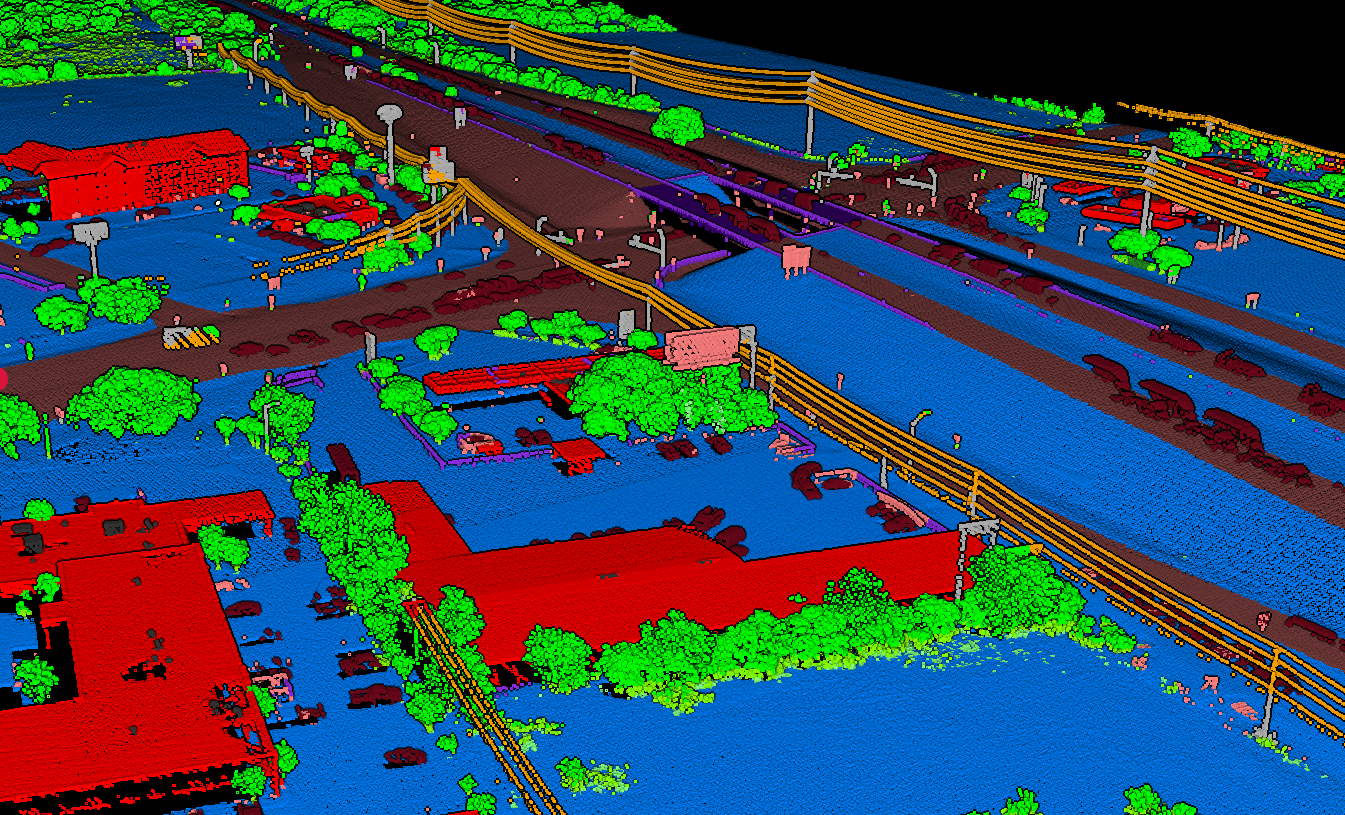
Lidarvisor is strongest when your bottleneck is turning raw point clouds into deliverables, not doing final drafting in a desktop CAD package. Upload LAS or LAZ data in the browser, run automatic classification, then export the terrain and vector products survey teams actually use: bare-earth DTM, DSM, hillshade, slope maps, contour lines, gridded points, building footprints, and DXF-ready outputs.
- No local installation for field crews, distributed offices, or consultants
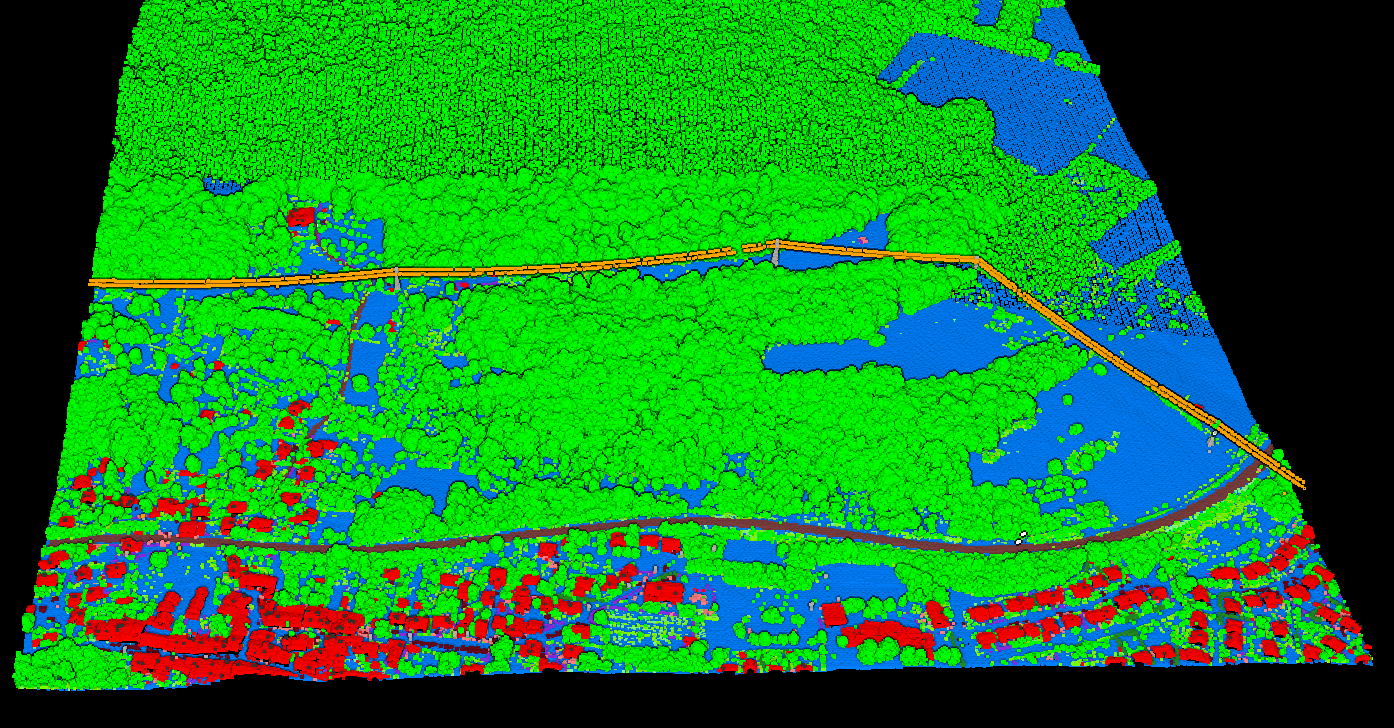
- Automatic classification across ground, low vegetation, medium vegetation, high vegetation, building, water, wire, tower, pole, vehicle, bridge deck, and fence or wall classes
- Survey-ready outputs in GeoTIFF, DXF, SHP, GeoJSON, LAS, and LAZ workflows
- Free start for evaluation so teams can test real survey datasets before changing the rest of the office stack
Recommended Survey Software Stack by Workflow
Topographic Surveys With LiDAR
georeferencing software, Lidarvisor, then CAD drafting or GIS finishing.
Drone Survey Firms
trajectory processing, cloud classification, then contour and DXF export.
Legacy CAD-Heavy Teams
keep final drafting in desktop CAD, but move classification and terrain generation upstream into a faster LiDAR processing environment.
The best topographic survey software is the tool that shortens the path from classified point cloud to finished deliverable. For most firms, that means evaluating software by project type, not just by brand familiarity.
Typical Topographic Survey Software Workflows
Boundary & Existing Conditions
Prioritize clean ground classification, DTM creation, and contour generation for base mapping.
Construction & Earthworks
Prioritize fast terrain models, slope outputs, and CAD-ready surfaces for design coordination.
Utility & Corridor Surveys
Prioritize long linear project handling, vegetation separation, wire and pole visibility, and exportable vector deliverables.
Buyer Checklist for Topographic Survey Software
- Can it classify ground points accurately enough for terrain extraction?
- Can it export DTM, contour lines, and CAD-friendly vectors without a long manual workflow?
- Does it support the formats your office already uses, such as LAS, LAZ, DXF, SHP, GeoJSON, and GeoTIFF?
- Does it reduce turnaround time for topo deliverables, or just add another review step?
- Can non-specialists use it without weeks of training?
Output Checklist for Land Surveying Software
| Needed output | Why survey teams need it | Lidarvisor fit |
|---|---|---|
| Digital Terrain Model (DTM) | Existing-ground surface for topo mapping, grading review, and drainage planning | Strong fit for bare-earth extraction from classified LiDAR |
| Contour lines | Common deliverable for topographic surveys and plan production | Strong fit when the workflow starts with clean ground points |
| DXF export | CAD handoff to drafting and engineering teams | Strong fit for downstream survey drafting workflows |
| GeoTIFF, SHP, and GeoJSON | GIS analysis, map production, and client data exchange | Strong fit for mixed CAD and GIS environments |
| Classified LAS or LAZ | QA, archive, and rework without restarting processing | Useful for auditability and later deliverable updates |
How to Choose the Right Land Surveying Software
- Choose Lidarvisor if you want browser-based classification, fast terrain outputs, and CAD or GIS exports without adding more desktop setup.
- Choose a CAD-native platform if final drafting inside one office standard matters more than speeding up upstream LiDAR processing.
- Choose a GIS-heavy platform if your work leans more toward mapping and raster analysis than topographic deliverable production.
Browser-Based vs Desktop Survey Software
Desktop Survey Software
Desktop survey software still makes sense when the final deliverable depends on deep drafting, corridor design, or office-wide CAD standards.
Browser-Based Processing
Browser-based processing is strongest earlier in the workflow, where the goal is to classify the point cloud, build terrain products quickly, and hand off clean outputs to the design environment the team already uses. That is the practical angle for Lidarvisor.
It does not try to replace the entire survey office stack. It removes friction from the LiDAR processing step so teams can move faster into CAD, GIS, and final deliverables.
Survey Deliverables That Matter Most
When survey buyers search for land surveying software, they are usually not buying a generic viewer. They are trying to shorten the path from raw elevation data to a deliverable a client or engineer can use.
That usually means a combination of bare-earth surfaces, contours, spot checks, and exchange formats that fit an existing CAD or GIS stack.
- Topographic map production: clean ground classification, contour extraction, and dependable spot elevations
- Existing-ground models: DTM outputs for grading studies, earthworks planning, and drainage review
- CAD handoff: DXF and linework-friendly exports for drafting teams
- GIS handoff: GeoTIFF, SHP, and GeoJSON outputs for mapping and analysis
- QA and archive workflows: classified LAS or LAZ files that can be rechecked later
Questions to Ask Before Choosing Topographic Survey Software
Most survey teams already have capture hardware and final drafting tools. The decision point is usually the middle of the workflow: which software turns point clouds into usable terrain products with the least cleanup.
A good evaluation should focus on output quality and turnaround time, not just feature count.
- How much manual classification cleanup is still required? If the software leaves heavy editing work after every run, it does not really save time.
- Can it generate DTM, DSM, and contours from the same dataset? Survey teams often need more than one surface product per project.
- Does it export the formats your office already uses? DXF, SHP, GeoJSON, GeoTIFF, and LAS should fit neatly into the handoff workflow.
- Can junior staff run it reliably? A tool that only one specialist can operate becomes a bottleneck.
- Does it support browser access or require heavy desktop setup? This matters for distributed teams, consultants, and subcontractors.
Related reading: LiDAR for Land Surveying, Digital Terrain Model Guide, Point Cloud to CAD, and LiDAR Contour Lines Guide.
FAQ
What is the best land surveying software for LiDAR data?
For LiDAR processing specifically, the best option depends on whether you need fast automated terrain outputs or deep desktop editing. Lidarvisor is well suited when you want rapid classification, DTM generation, contour extraction, and CAD-ready exports without desktop setup.
Can land surveying software create contour lines from LAS files?
Yes. After ground classification, survey software can interpolate a terrain surface and derive contour lines. The output quality depends heavily on clean ground classification and sensible contour intervals.
What is topographic survey software used for?
Topographic survey software is used to turn elevation data into practical deliverables such as terrain models, contour lines, spot elevations, and CAD or GIS exports. In LiDAR workflows, that usually starts with point cloud classification and ground extraction.
What outputs do surveyors typically need from LiDAR software?
Common outputs include classified LAS or LAZ files, DTM, DSM, hillshade, slope maps, contour lines, gridded terrain points, and DXF or SHP deliverables for CAD and GIS.
What is the difference between land surveying software and CAD software?
Land surveying software often covers terrain extraction, point cloud classification, and deliverable preparation. CAD software is usually the final drafting environment where linework, sheets, and design details are finished. Many survey teams use both in the same workflow.
Related
Two related workflows: stockpile inventory software for volumes and automatic vectorization to CAD for linework.
Start Processing Survey LiDAR Faster
If your survey workflow already has capture tools and CAD drafting software, you probably do not need more desktop setup. Start with Lidarvisor to classify the point cloud, generate terrain products, and export survey-ready outputs before the file ever reaches final drafting. A free account lets you test the workflow on up to 50 hectares before committing to a bigger production stack.
Create free account50 hectares free. No credit card. No software to install.