

Removing Vehicles and Temporary Objects from LiDAR Data
The Problem: Temporary Objects in LiDAR Data
When a LiDAR sensor scans an area, it records returns from every surface the laser pulses strike. This includes objects that don’t belong in your final terrain model.
If these objects remain in your data, they contaminate derivative products. Your DTM shows artificial bumps where cars were parked. Contour lines warp around truck beds. Building footprints include vehicle outlines.
How Classification Enables Cleaning
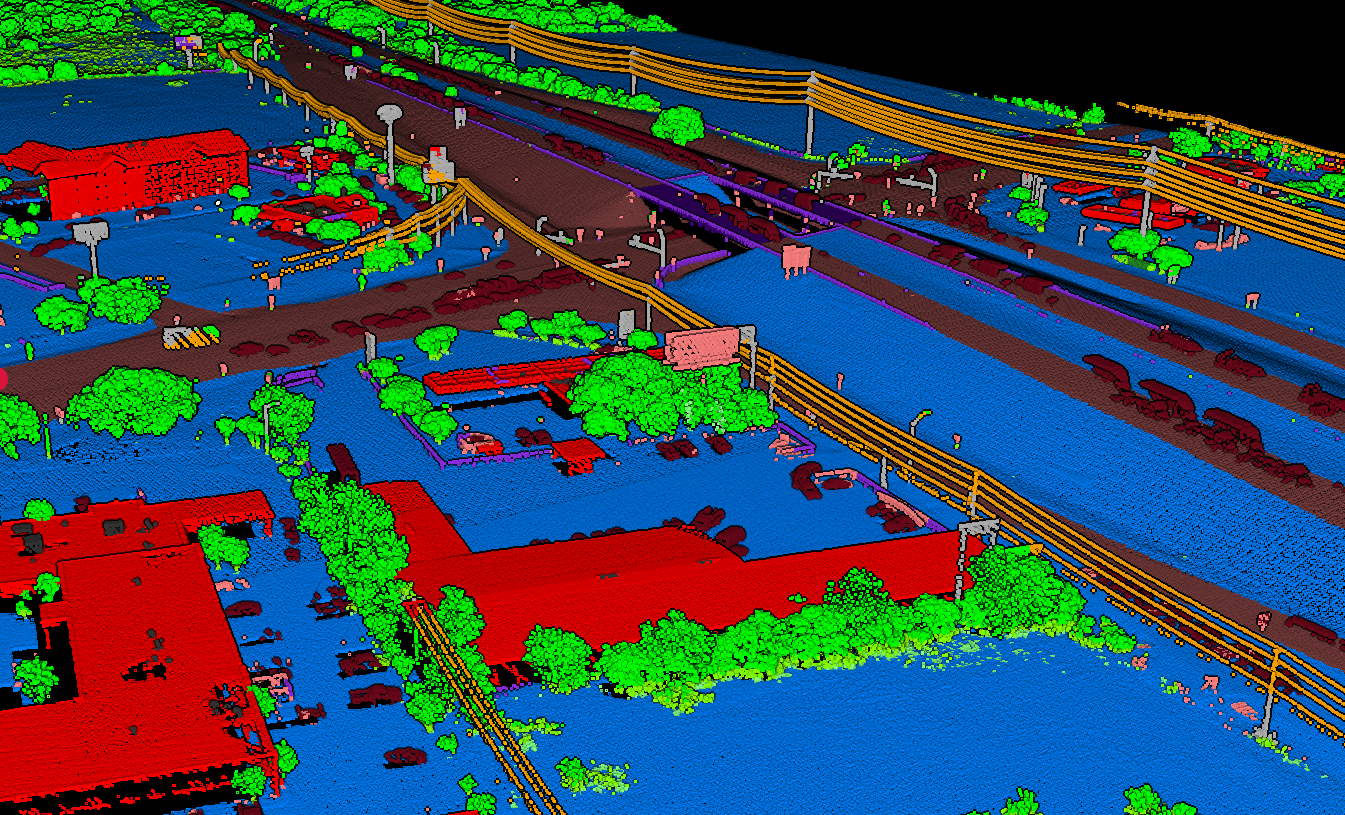
The solution lies in classification: assigning each point to a category based on what surface it represents. Standard LiDAR classifications include:
- Ground: Bare earth surface
- Vegetation: Trees, shrubs, grass
- Building: Rooftops and structures
- Vehicle: Cars, trucks, mobile objects
- Noise: Atmospheric interference, outliers
Once points are classified, filtering is straightforward. Remove the vehicle class, and those temporary objects disappear, revealing the ground beneath.
Why Automatic Vehicle Classification Matters
Manual point cloud cleaning is tedious and error-prone. In a typical urban dataset, thousands of individual points may belong to vehicles scattered across the scene. Manual selection takes hours,and operators inevitably miss objects or accidentally remove valid ground points.
Automatic Detection Criteria
Lidarvisor identifies vehicles based on their geometric characteristics:
- Height above ground: Vehicles sit 0.2–2.5m above the surface
- Shape patterns: Rectangular footprints, curved rooflines
- Context: Located on roads, parking areas, driveways
- Isolation: Distinct from surrounding ground returns
The Result
The algorithms analyze these characteristics across your entire point cloud, identifying and tagging vehicles automatically.
- ✅ Clean data in minutes, not hours
- ✅ Consistent results across large datasets
- ✅ No manual point selection required
- ✅ Ground points preserved beneath vehicles
The Cleaning Workflow
01
Classification
Upload your raw point cloud. Lidarvisor classifies points into categories including ground, vegetation, buildings, water, vehicles, poles, wires, and more.
02
Quality Review
Visualize the classified point cloud, focusing on the vehicle class. Verify that actual vehicles are correctly identified and ground points beneath are preserved.
03
Generate Clean Products
DTM, contours, and slope maps automatically exclude vehicle-classified points. You receive clean outputs without manual editing.
Beyond Vehicles: Other Temporary Objects
- High Noise Points: Atmospheric interference, birds, and sensor artifacts create scattered outliers far above or below terrain. Classification identifies and removes them.
- Roof Objects: HVAC units, solar panels, and rooftop equipment can be separated from the main building structure.
- Moving Objects: Vehicles in motion create distinctive artifacts: elongated shapes, ghosted duplicate returns. The algorithms recognize and handle these appropriately.
Use Cases for Clean Point Clouds
Best Practices
When possible, acquire LiDAR when temporary objects are minimized: early mornings, weekends, or off-peak hours. Less contamination means cleaner results, even with excellent classification.
Spot-check classification in areas where accuracy matters most. While automatic classification handles the vast majority of cases correctly, visual verification catches edge cases.
Keep your raw, unclassified point cloud archived. Classification is non-destructive. You can always reprocess or adjust. But if you only save filtered outputs, that original data is lost.
Create a FREE account now and start processing your point cloud
Get 2 GB of storage space and classify up to 10 hectares for free.