

Complete Step-by-Step Tutorial
What is USGS 3DEP?
The 3D Elevation Program is a USGS initiative to collect and distribute high-resolution elevation data for the nation. All data is free to download with no account required.
📡
LiDAR Point Clouds
LAZ format (compressed LAS)
🏔️
DEMs
1m, 1/9″, 1/3″ arc-second
🌲
DSMs
Including buildings & vegetation
🛰️
IfSAR Data
For Alaska coverage
Method 1: Using 3DEP LidarExplorer
Recommended for Point Clouds
The 3DEP LidarExplorer is the best tool for finding and downloading LiDAR point cloud data.
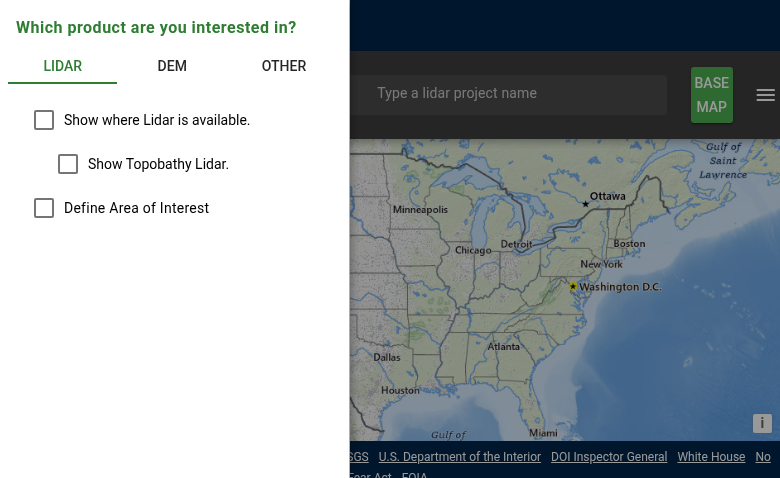
The USGS LidarExplorer main interface with product selection and search tools
01
Access LidarExplorer
Navigate to apps.nationalmap.gov/lidar-explorer. The interface displays a map of the United States with LiDAR coverage shown in different colors based on data quality and collection date.
Select your product type:
- Lidar: For point cloud data (LAZ format)
- DEM: For pre-processed elevation models
- Other: For specialized products
02
Check Data Availability
Enable “Show where Lidar is available” to see coverage on the map. The color-coded display shows data quality levels:
- QL0: Highest quality, ≤0.35m nominal point spacing
- QL1: High quality, ~0.35m NPS
- QL2: Standard 3DEP, ~0.7m NPS
- QL3: Lower density, ~1.4m NPS
Click on any colored area to see detailed information including collection date and point density.
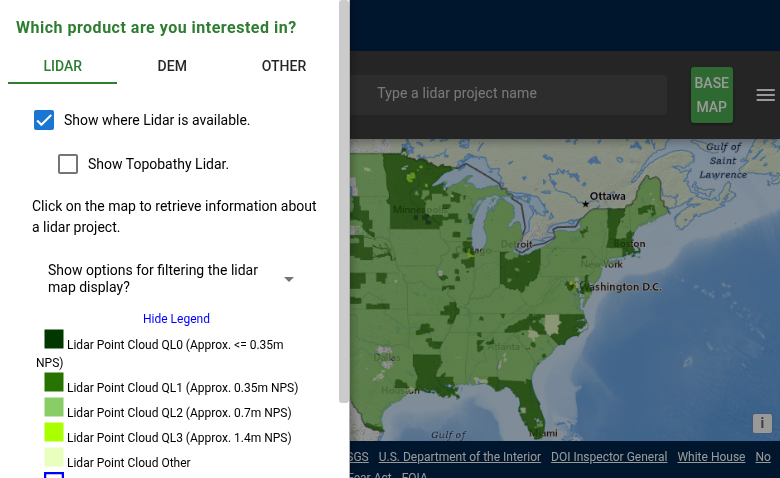
Coverage map showing Quality Level legend – darker green indicates higher quality data
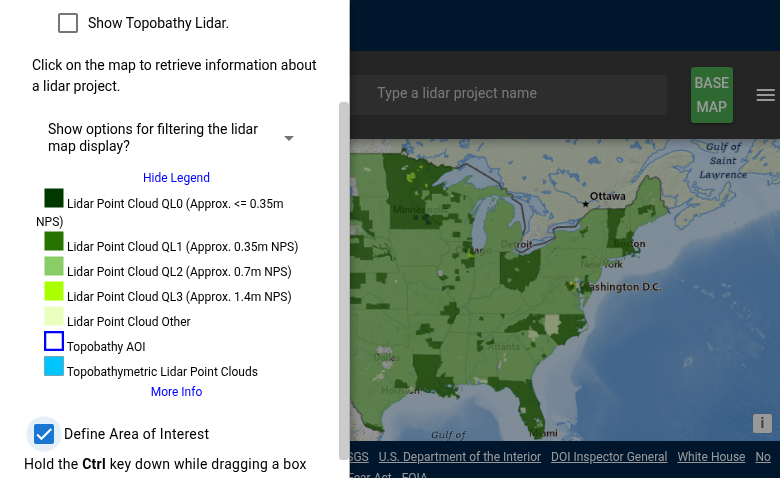
Area of Interest tools – hold Ctrl while dragging to draw a selection box
03
Navigate & Select Area
Find your target area using these methods:
- Search box: Enter a place name, address, or coordinates in the search bar at the top
- Zoom and pan: Use your mouse wheel to zoom and click-drag to pan the map
- Draw a boundary: Check “Define Area of Interest” then hold Ctrl while dragging to draw a selection box
The map will show available data tiles within your selected area.
04
Download the Data
Once you’ve selected your area of interest:
- Click on your area of interest to select it
- Review the available tiles in the results panel
- Click the download icon next to individual tiles, or
- Use “Add to Cart” for multiple tiles, then download as a batch
Point cloud data downloads as LAZ files (compressed LAS format). Most GIS and LiDAR processing software can read LAZ directly, including Lidarvisor, CloudCompare, QGIS, and PDAL.
Method 2: Using TNM Download Client
Best for DEMs & Multiple Datasets
The TNM Download Client provides access to all National Map datasets, including 3DEP elevation data.
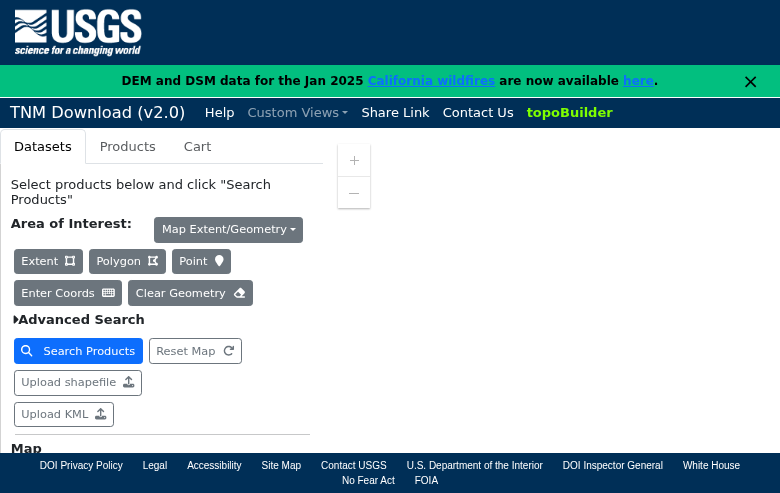
The National Map Download Client interface with area selection and dataset options
Step 1: Define Your Area
Choose one of these methods:
- Extent: Uses the visible map area
- Polygon: Click to create polygon vertices
- Point: Select a specific location
- Enter Coords: Input bounding box coordinates manually
Step 2: Select Data Type
In the Datasets tab, expand “Elevation Products (3DEP)”:
- 1 meter DEM: Highest resolution seamless coverage
- 1/3 arc-second DEM: ~10m resolution, nationwide
- 1 arc-second DEM: ~30m resolution
- Lidar Point Cloud (LPC): Raw point cloud tiles
Step 3: Search & Download
Click “Search Products” then download individual files or use the cart for batch downloads.
Understanding File Formats
📡 Point Cloud Formats
LAZ — Compressed LAS format, used by USGS. Typically 5-10x smaller than LAS. Supported by most LiDAR software including Lidarvisor.
LAS — Industry-standard uncompressed format (not offered directly by USGS, but LAZ can be converted).
🏔️ DEM Formats
GeoTIFF — Raster elevation data with embedded georeferencing. Compatible with all GIS software.
IMG — ERDAS Imagine format (some older datasets).
Tips for Large Downloads
Alternative Access Methods
☁️ Amazon Web Services (AWS)
USGS 3DEP data is also available through AWS Open Data. This can be faster for programmatic access or cloud-based workflows.
🌐 Web Map Services (WMS/WCS)
For visualization or extracting small areas, use the 3DEP web services directly in GIS software without downloading files.
Perfect for quick previews before committing to full downloads.
Processing Your Downloaded Data
Once you have downloaded your USGS 3DEP LiDAR data, you’ll need to process it to extract useful products. Lidarvisor offers a streamlined workflow for processing LAZ point clouds.
Frequently Asked Questions
No. All USGS 3DEP data is free and publicly accessible without registration. Simply navigate to your area of interest and download.
Data currency varies by location. Use LidarExplorer to check collection dates for your area. Urban and high-priority areas typically have newer data, with some areas having multiple collections over time.
Point clouds are typically in UTM coordinates with NAD83 datum and NAVD88 vertical datum. DEMs use either UTM or geographic coordinates depending on the product. Each dataset includes metadata specifying the exact coordinate reference system.
Yes. USGS data is in the public domain and can be used for any purpose without restrictions. There are no licensing fees or attribution requirements, though crediting USGS is good practice.
Quality Levels (QL0-QL3) indicate point density and accuracy. QL0 has the highest density (≤0.35m nominal point spacing), while QL2 is the standard 3DEP specification at ~0.7m spacing with 2 points per square meter. Higher quality levels provide more detail but result in larger file sizes.
For large areas, use the cart feature to collect multiple tiles, then generate a download script (wget or curl format). This allows automated downloading and is more reliable than manually downloading hundreds of files. Plan for overnight downloads for county-sized areas.