

Complete Step-by-Step Tutorial
What is PNOA LiDAR?
The Plan Nacional de Ortofotografía Aérea (PNOA) is Spain’s national program for capturing aerial imagery and elevation data. Since 2009, the PNOA-LiDAR project has been systematically scanning the entire Spanish territory using airborne LiDAR sensors. Data is provided by IGN (Instituto Geográfico Nacional) and distributed through the CNIG (Centro Nacional de Información Geográfica).
📡
Point Clouds
Classified LAZ with RGB color
🎯
High Precision
Up to 5 pts/m², ≤10cm accuracy
🇪🇸
Full Coverage
Spain + Islands + Ceuta/Melilla
🔓
Free Access
CC-BY 4.0 license
Key Specifications by Coverage
Three Generations of National LiDAR Collection
Coordinate System: ETRS89/REGCAN95 in UTM zones 28-31 | Vertical Datum: EGM08 geoid
Step-by-Step Download Guide
Navigate the CNIG Download Center
Follow these steps to access and download LiDAR point cloud data from Spain’s national download center. The interface is available in Spanish and English.
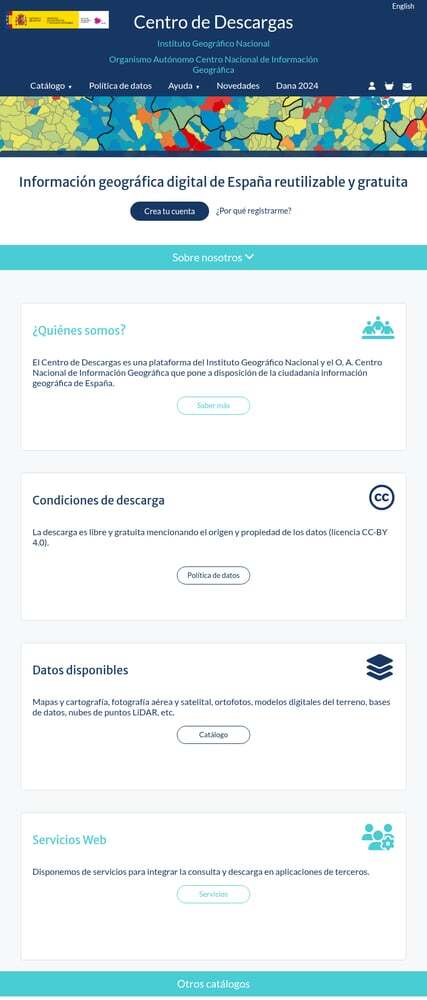
CNIG Download Center homepage showing available data products
01
Access the CNIG Download Center
Navigate to centrodedescargas.cnig.es to access Spain’s official geospatial data repository. Use the language toggle for English.
Getting started:
- No registration required: Download immediately as a guest
- Free account: Removes 20-file limit for bulk downloads
- Popular products: LiDAR, orthofotos, terrain models on homepage
02
Navigate to LiDAR Products
From the main page, go to Catálogo (Catalog) and select “Modelos digitales de elevaciones” (Digital Elevation Models). Or use direct links:
Direct product links:
- 2nd Coverage LiDAR (2015-2021) — Complete national coverage
- 3rd Coverage LiDAR (2022-2025) — Highest quality, being completed
You can also search directly for “LIDAR” in the text search box.
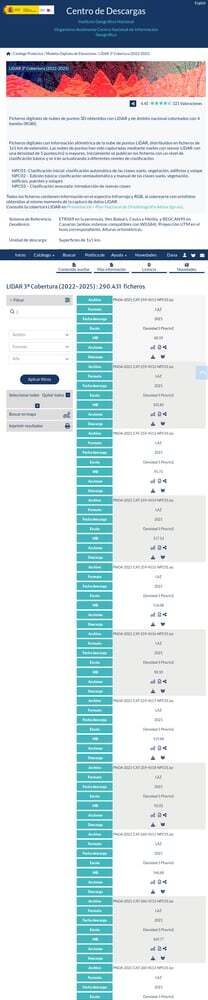
LiDAR 3rd Coverage product page with filter and file listing
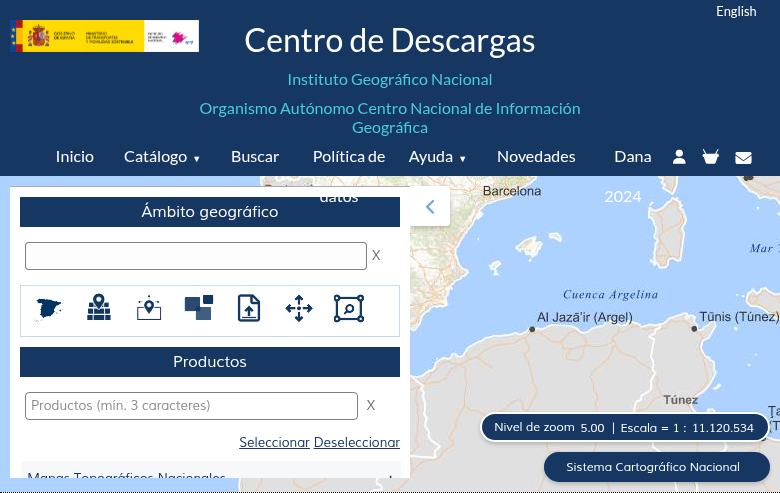
Interactive map search with product filter panel
03
Select Your Area of Interest
You have several options to find data for your area:
Search methods:
- Map Search: Click “Buscar en mapa” to navigate and select tiles visually
- Text Search: Enter municipality name, province, or coordinates
- MTN50 Sheet: Search by 1:50,000 topographic map sheet (1-1111)
- Administrative Unit: Filter by Autonomous Community, Province, or Municipality
Click on any tile to see metadata and add it to your download cart.
04
Add Files & Download
For each file you want to download:
Download process:
- Click the shopping cart icon to add individual files
- Or use “Seleccionar todos” (Select All) for bulk selection
- Click “Descargar” (Download) for individual files
- Or use “Descarga masiva” (Bulk Download) for multiple files
Note: Without registration, you can download up to 20 files at once. Register for free to remove this limit.
🛒 Using the Download Cart
Files can be added to your cart using the shopping cart icon next to each file. Your cart appears in the top right corner showing pending files.
✦ Review selections before downloading
Available Data Products
Point Clouds and Derived Terrain Models
File Formats Available
📦 Point Cloud Formats
LAZ: Compressed LAS point cloud (LAS 1.2 or 1.4)
Best for: Point cloud analysis, 3D visualization, custom processing
File Sizes:
1st/2nd Coverage: 5-100 MB per tile
3rd Coverage: 50-300 MB per tile
🗺️ DEM Formats
✦ GeoTIFF — GIS analysis, terrain visualization
✦ ASC / TXT — ASCII grid, simple text processing
✦ ECW — Large area visualization, web mapping
Tips for Large Downloads
Technical Specifications
🗺️ Coordinate Systems
Horizontal CRS: ETRS89 (mainland, Baleares, Ceuta, Melilla)
Canary Islands: REGCAN95 (compatible with WGS84)
Projection: UTM zones 28, 29, 30, or 31
EPSG Codes: 25828, 25829, 25830, 25831
📊 Point Classification
PNOA LiDAR data includes ASPRS standard classification:
✦ Ground (Class 2)
✦ Vegetation (Classes 3-5)
✦ Buildings (Class 6)
✦ Water (Class 9)
Processing Your Downloaded Data
Once you have downloaded your Spanish LAZ files, you’ll need to process them to extract useful products. Lidarvisor offers a streamlined workflow for processing point clouds.
Frequently Asked Questions
Yes! All PNOA LiDAR data is freely available for download and use under Spain’s CC-BY 4.0 license. When using the data publicly, attribute it to: “© Instituto Geográfico Nacional de España” or “PNOA LiDAR – IGN”. Commercial use is permitted with attribution.
No, you can download without registration. However, creating a free account offers benefits: unlimited bulk downloads (vs. 20 files for guests), download history tracking, notifications for new data releases, and ability to save favorite products. Registration only requires an email address.
Choose based on your needs:
- 3rd Coverage (2022-2025): Best quality with 5 pts/m² density and ≤10 cm vertical accuracy. Ideal for detailed analysis, but coverage is still being completed.
- 2nd Coverage (2015-2021): Good balance of quality and complete national coverage. Recommended for most users needing full Spain coverage.
- 1st Coverage (2009-2015): Lower density (0.5 pts/m²) but useful for historical comparison or large-scale regional analysis.
Check the project status page for current 3rd coverage availability.
PNOA LiDAR uses ETRS89 for mainland Spain, Balearic Islands, Ceuta, and Melilla; REGCAN95 for Canary Islands (both compatible with WGS84). The projection is UTM in the appropriate zone (28, 29, 30, or 31). Vertical heights are orthometric using the EGM08 geoid model. Use EPSG codes 25828, 25829, 25830, or 25831 depending on the UTM zone.
Several methods: Use “Búsqueda por mapa” in the CNIG portal to visually select tiles, enter municipality names/provinces/coordinates in text search, search by 1:50,000 map sheet number if known, or enter UTM or lat/lon coordinates. Tile naming follows UTM coordinates of the upper-left corner — for example, “PNOA_2022_NAV_442_4754_ORT-CLA-COL” is in Navarra at UTM coordinates 442000, 4754000.
LAZ files from CNIG can be opened with any LAS-compatible software. Free options include CloudCompare, QGIS (with LAStools plugin), and Fugro Viewer. Commercial options include Global Mapper, ArcGIS Pro, and AutoCAD. For cloud-based processing without software installation, upload directly to Lidarvisor.