

Step-by-Step Tutorial
What is NOAA Digital Coast?
NOAA Digital Coast is a data repository managed by the National Oceanic and Atmospheric Administration’s Office for Coastal Management. It provides free access to elevation data (including LiDAR point clouds), imagery, and land cover data for coastal areas of the United States.
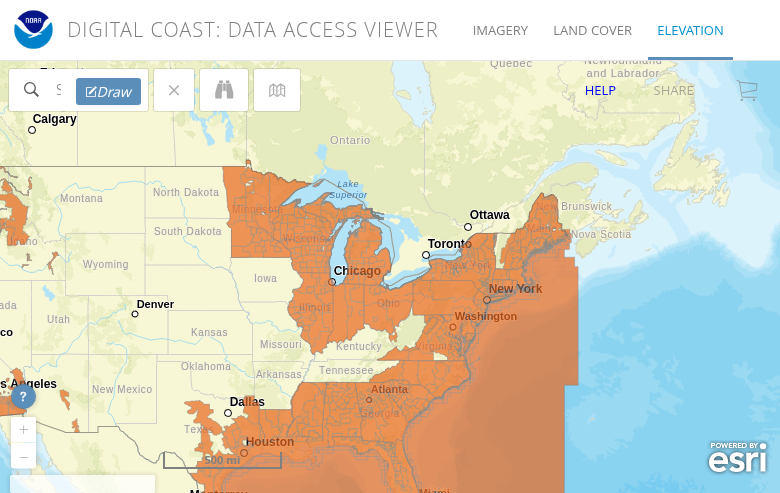
The NOAA Data Access Viewer showing LiDAR coverage (orange areas)
01
Access the Data Viewer
Navigate to the NOAA Data Access Viewer at coast.noaa.gov/dataviewer. Click on Elevation/Lidar to access the LiDAR data interface.
The orange areas on the map show where LiDAR data is available. Coverage includes the Atlantic, Gulf, and Pacific coasts, Great Lakes, Alaska, Hawaii, and U.S. territories.
02
Draw Your Selection Area
Use the search bar to navigate to your area of interest, or zoom and pan manually on the map.
Click the Draw button in the toolbar and draw a polygon or rectangle around your target area. The system will show you all available datasets for that region.
Tip: Keep your selection area reasonable in size. The custom processing system handles requests up to 1.5 billion points. For larger areas, use the bulk download option.
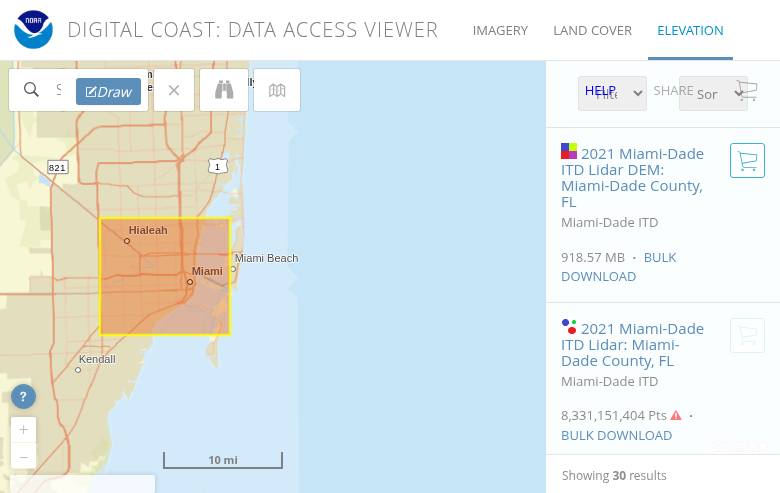
Selection area in Miami with search results showing 30 available datasets
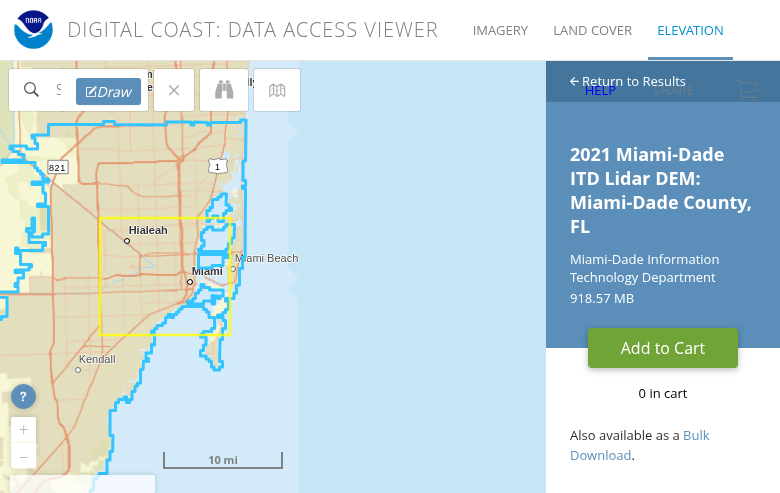
Dataset details panel showing metadata and Add to Cart button
03
Select Your Dataset
After drawing your area, a panel will show available datasets. Filter by:
- Year – Select the collection year
- Data Provider – USGS, USACE, state agencies, etc.
- Elevation Product – Point cloud (PTS), DEM, or contours
Click on a dataset to see its metadata, including collection dates, point density, accuracy specifications, and available formats. Click Add to Cart when you’ve found what you need.
04
Customize Output Options
Click the cart icon and then Next to access output customization:
- Projection – Choose your coordinate system (UTM, State Plane, Geographic)
- Vertical Datum – NAVD88, ellipsoid heights, or local tidal datums
- File Format – LAS, LAZ, GeoTIFF (for DEMs), Shapefile (for contours)
- Tiling – Select tile sizes for manageable file sizes
Recommended: Always choose LAZ format for point clouds – it reduces file size by 80-90% with no data loss.
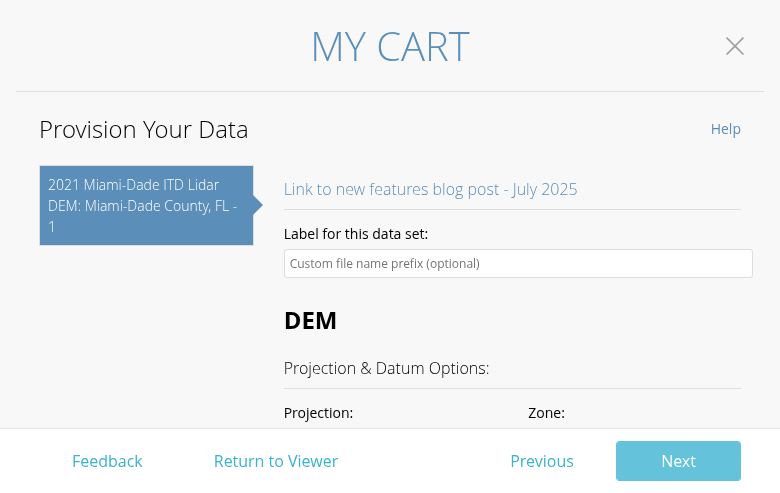
Provision Your Data page with projection and format options
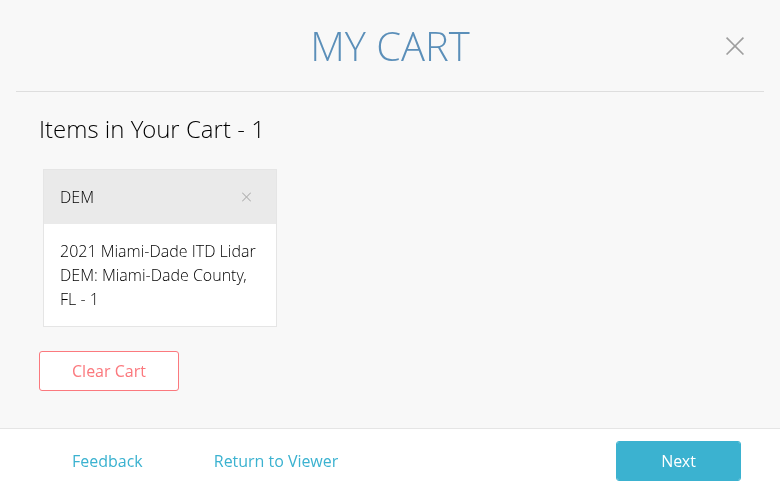
Cart interface showing items ready for checkout
05
Submit & Download
Review your selections and click Next to enter your email address. NOAA will process your request and send a download link when ready.
Processing times vary:
- Small areas (under 100 million points): Usually within 30 minutes
- Medium areas: 1-4 hours
- Large areas (approaching 1.5 billion points): Up to 24 hours
Download links typically remain active for 7 days.
Available File Formats
NOAA Digital Coast offers multiple output formats depending on your needs:
| Format | Type | Best For |
|---|---|---|
| LAZ | Point Cloud | Compressed LiDAR – recommended for all point cloud downloads |
| LAS | Point Cloud | Uncompressed LiDAR – larger files but universal compatibility |
| GeoTIFF | Raster | Digital Elevation Models (DEMs) for GIS analysis |
| Shapefile | Vector | Contour lines and breaklines for CAD/GIS |
Tips for Large Downloads
💾 Use Bulk Download for Full Datasets
If you need an entire county or full dataset (over 1.5 billion points), use the bulk download links instead of custom processing. Find them at: NOAA Coastal LiDAR S3 Index
📦 Choose LAZ Over LAS
Always select LAZ format for point clouds. The compression reduces download time and storage requirements by up to 90%, with no loss of data quality. Most modern software reads LAZ directly.
🧩 Break Large Areas into Tiles
For very large project areas, make multiple smaller requests rather than one massive download. This provides faster processing times and easier troubleshooting if a download fails.
💿 Check Storage Space First
LiDAR data is large. A single county might be 10-50 GB in LAZ format, or 100-500 GB uncompressed. Ensure you have adequate disk space before downloading.
Process Your NOAA Data in Lidarvisor
Once you have downloaded your NOAA Digital Coast data, you can process it directly in Lidarvisor. Our cloud-based platform handles LAZ and LAS files without any format conversion.
With Lidarvisor, you can:
✦ Upload LAZ/LAS files directly to the cloud
✦ Automatically classify ground, vegetation, buildings, and water
✦ Generate DTMs, DSMs, and contour lines
✦ Export to CAD-ready formats (DXF, SHP)
✦ Process large datasets without hardware limitations
Frequently Asked Questions
Yes, all data on NOAA Digital Coast is free to download and use. There are no registration fees, subscription costs, or per-download charges. The data is in the public domain.
NOAA Digital Coast focuses on coastal areas of the United States, including the Atlantic, Gulf, and Pacific coasts, Great Lakes, Alaska, Hawaii, Puerto Rico, and U.S. territories. Coverage extends inland from the coast, typically including the full coastal zone and adjacent areas. The Data Access Viewer shows exactly what data is available for any location.
Accuracy varies by dataset, but most NOAA topographic LiDAR meets USGS Quality Level 2 (QL2) standards or better. This typically means vertical accuracy of 10 cm RMSE or better, with point densities of 2-8 points per square meter. Check the metadata for each dataset to see its specific accuracy specifications.
NOAA continuously adds new datasets as they become available from various collection programs. Major coastal areas may have multiple datasets from different years, allowing you to compare changes over time. The Data Access Viewer shows collection dates for all available datasets.
If NOAA Digital Coast does not cover your area, check these alternative free LiDAR sources:
- USGS 3DEP – National coverage, especially inland areas
- OpenTopography – Research-grade datasets worldwide
- State GIS portals – Many states have their own LiDAR repositories