

Step-by-Step Tutorial
What is NEON?
NEON is a continental-scale observation facility operated by Battelle and funded by the National Science Foundation. Their Airborne Observation Platform (AOP) collects LiDAR data annually at sites spanning diverse ecosystems, from Alaska tundra to Puerto Rico tropical forests.

NEON Data Portal homepage with search and map features
01
Access the NEON Data Portal
Start by visiting data.neonscience.org. The portal features:
- Search bar: Type keywords like “LiDAR” or specific site codes
- Interactive map: Browse 81 NEON field sites across the US
- Quick links: Access Explore Data Products, Data API, and tutorials
No account is required for browsing, but signing in gives you download tracking and personalized features.
02
Search for LiDAR Data Products
Use the search bar to find LiDAR products. Key data products include:
- DP1.30003.001 — Discrete return LiDAR point cloud (LAZ format)
- DP3.30024.001 — Elevation – LiDAR (DTM/DSM in GeoTIFF)
- DP3.30015.001 — Ecosystem structure (Canopy Height Model)
- DP3.30025.001 — Slope and Aspect derived from LiDAR
Each product shows availability charts by site and year, making it easy to find data for your area of interest.
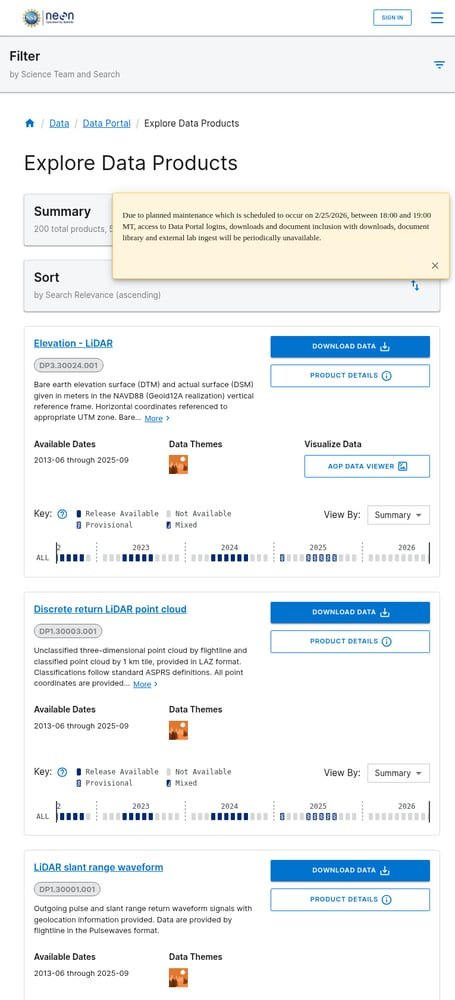
Search results showing available LiDAR data products

Product details page with metadata, documentation, and availability
03
Review Product Details
Click on a data product to view its details page. Here you’ll find:
- Description & Abstract: Technical specifications and methodology
- Documentation: Quick Start Guides, ATBDs, and design documents
- Issue Log: Known data quality issues and resolutions
- Availability Chart: Visual timeline showing data by site and year
Data is available from 2013 onwards, with annual collections at most sites. Check the availability chart to confirm data exists for your study area.
04
Configure Your Download
Click “Download Data” to open the download configuration wizard. Complete these steps:
- Sites & Dates: Select field sites and date ranges using the interactive chart
- Provisional Data: Choose whether to include provisional (not yet quality-assured) data
- Files: Select specific file types (classified vs unclassified point clouds)
- Documentation: Include metadata and documentation with your download
- Policies: Accept the NEON data use policy
The wizard estimates download size before you commit.

Download configuration wizard with site and date selection
NEON API documentation for programmatic access
05
Download Your Data
After completing configuration, review your summary and click Download. You have two options:
Web Download: Direct download through the browser (best for smaller datasets)
API Download: Use the NEON Data API for programmatic access with R (neonUtilities package) or Python
Point cloud data is delivered in LAZ format organized by 1km tiles. Elevation products come as GeoTIFF files with UTM projection and NAVD88 vertical datum.
Available File Formats
NEON provides LiDAR data in industry-standard formats ready for GIS and remote sensing workflows:
| Format | Type | Best For |
|---|---|---|
| LAZ | Point Cloud | 3D analysis, terrain modeling, vegetation studies |
| GeoTIFF | Raster | DTM, DSM, CHM, slope/aspect analysis |
| Pulsewaves | Full Waveform | Advanced vegetation analysis, biomass estimation |
Tips for Working with NEON Data
📍 Coordinate Systems
NEON uses UTM projections (zone varies by site) with ITRF00 datum horizontally and NAVD88 (Geoid12A) vertically. Check metadata for your specific site’s UTM zone.
📦 Data Organization
Point clouds come in 1km x 1km tiles. Unclassified data is organized by flight line. Use tile naming to merge adjacent areas.
🔬 Use neonUtilities
NEON’s R package neonUtilities simplifies downloading and stacking data. For Python users, check out the neonstore package.
⚠️ Check Issue Logs
Always review the Issue Log for your data product. NEON documents known issues like noise artifacts or misalignments with specific sites/dates.
Process Your NEON Data in Lidarvisor
Downloaded your NEON LiDAR data? Process it instantly in the cloud without expensive hardware.
With Lidarvisor, you can:
✦ Upload LAZ/LAS files directly to the cloud
✦ Automatically classify ground, vegetation, buildings, and water
✦ Generate DTMs, DSMs, and contour lines
✦ Export to CAD-ready formats (DXF, SHP)
✦ Process large datasets without hardware limitations
Frequently Asked Questions
Yes! All NEON data is completely free and open access. There are no registration requirements to browse, and you can download without an account. Creating an account is optional but provides benefits like download tracking and early access to provisional data.
NEON AOP collects discrete return LiDAR at approximately 1-4 points per square meter, depending on the site and vegetation conditions. Multiple returns are recorded per pulse, making the data suitable for vegetation structure analysis.
NEON aims to collect AOP data annually at each field site, typically during the period of maximum greenness (varies by ecosystem). Data becomes available approximately 60 days after the final collection day at each site.
NEON LAZ files can be opened with any LAS-compatible software including CloudCompare (free), QGIS (free), ArcGIS Pro, PDAL, LAStools, and Lidarvisor. GeoTIFF products work in any GIS software including QGIS, ArcGIS, and GRASS GIS.
Provisional data is newly collected data that has passed initial quality checks but hasn’t gone through full quality assurance. Release data (e.g., RELEASE-2026) has been fully quality-assured and is assigned a DOI for citation. Use release data for publications.
More Free LiDAR Data Tutorials
Explore our complete collection of free LiDAR data download tutorials: