

Complete Step-by-Step Tutorial
What is the National Land Survey of Finland?
The National Land Survey of Finland (Maanmittauslaitos, NLS) is the government agency responsible for producing and maintaining geospatial data for Finland. As part of Finland’s commitment to open data, the NLS provides free access to extensive laser scanning datasets covering the entire country since 2019.
📡
Point Clouds
LAZ format, classified data
🏔️
Elevation Models
2m DTM from laser scanning
🇫🇮
Full Coverage
100% of Finland (~338,000 km²)
🔓
CC BY 4.0
Free for any use
Step-by-Step Download Guide
Navigate the NLS MapSite Interface
Follow these steps to access and download laser scanning data from Finland’s national mapping service. The interface is available in English, Finnish, and Swedish.
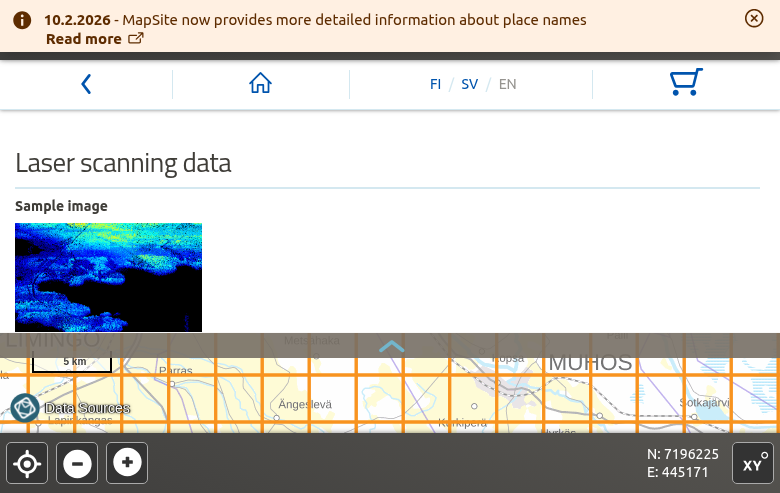
NLS MapSite laser scanning data page
01
Access the NLS MapSite
Navigate to the National Land Survey’s MapSite download service:
asiointi.maanmittauslaitos.fi/karttapaikka/tiedostopalvelu
Getting started:
- Language: Switch to English using the language selector
- No registration: Free data requires no account
- Map navigation: Zoom and pan to your area of interest
02
Select Laser Scanning Data
On the download page, scroll down to find “Open vector datasets” and click on “Laser scanning data”.
Two product options:
- Latest laser scanning data — Recommended, combines all available data
- 0.5 p (2020-) — Newer high-density derived data
- 0.5 p (2008-2019) — Legacy coverage
The map interface will display the tile grid overlay for your selected product.
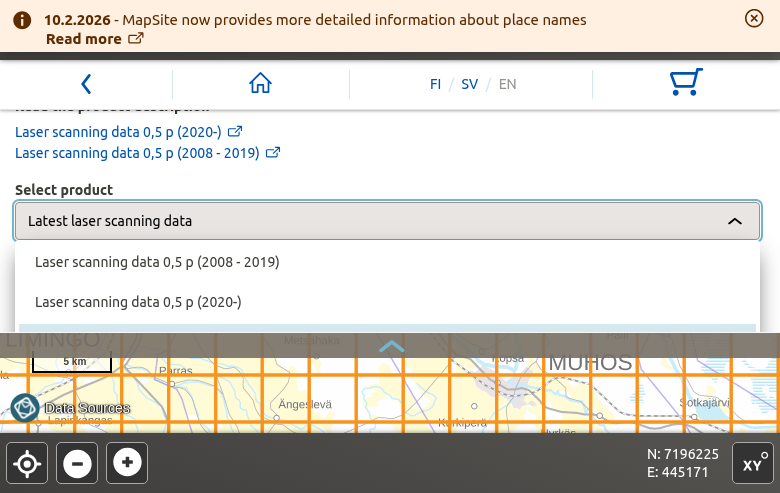
Product selection dropdown with laser scanning options
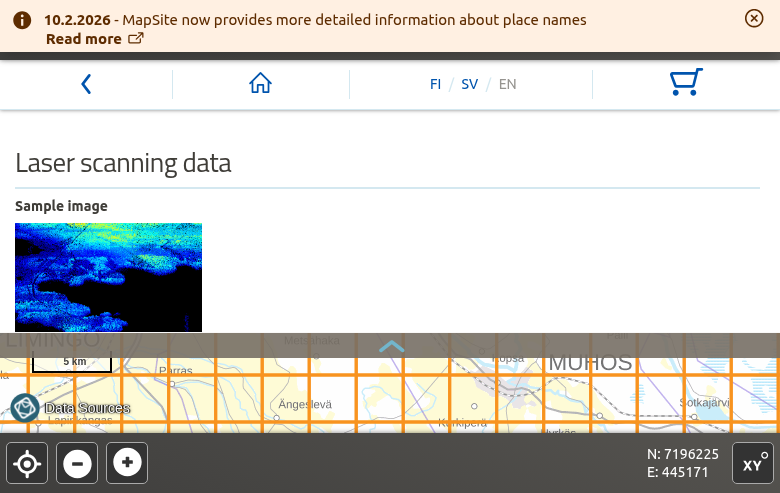
Map interface showing the 3×3 km tile grid overlay
03
Select Your Area on the Map
Navigate to your area of interest using the map controls:
Selection options:
- Click tiles — Select individual 3×3 km map sheets
- Rectangle tool — Draw a box to select multiple tiles
- Search — Find locations by place name
The orange grid lines show available tile boundaries. You can select up to 100 map sheets per order.
04
Add to Cart and Download
After selecting your tiles:
Order process:
- Click “Add to shopping cart”
- Review your selection in the cart (cart icon)
- Enter your email address to receive download links
- Click “Order” to submit
You’ll receive an email with download links within minutes. Links remain active for approximately 7 days.
💡 Pro Tip
Downloadable open data products are always free of charge. The files are delivered in compressed LAZ format which can be opened directly in most LiDAR software.
Alternative access: Use kartat.kapsi.fi for direct FTP/HTTP downloads without the order system.
Technical Specifications
📡 Laser Scanning Data 0.5 p (Free)
Point Density: 0.5 points/m² (~1.4m spacing)
Coverage: 100% of Finland
Tile Size: 3 × 3 km (UTM 5000 sheets)
File Format: LAZ 1.2
License: CC BY 4.0
🎯 Laser Scanning Data 5 p (Fee-based)
Point Density: ≥5 points/m² (~0.4m spacing)
Coverage: Expanding (2020 onwards)
Tile Size: 1 × 1 km blocks
File Format: LAZ 1.2 (2020-2023), LAZ 1.4 (2024+)
License: Separate terms (requires authentication)
🗺️ Coordinate Systems
Horizontal CRS: ETRS-TM35FIN (EPSG:3067)
Vertical Datum: N2000 height system
Reference: European Vertical Reference System (EVRS)
📅 Data Timeline
Legacy Coverage: 2008-2019 (nationwide)
High-Density Programme: 2020 onwards
Updates: Continuous scanning and processing
Point Cloud Classifications
Standard LAS 1.2 Classification Schema
Available File Formats
📦 LAZ
Primary Format
Losslessly compressed LAS format (7-20% of original size). Point cloud data — primary distribution format for laser scanning.
🗺️ GeoTIFF
Raster Format
Georeferenced raster image format. Used for elevation models (DTM, DSM) and derived products.
📝 ASCII Grid
Text Format
Text-based raster format. Alternative format for elevation models with wide software compatibility.
Tips for Finland LiDAR Data
Processing Your Downloaded Data
Once you have downloaded your Finland LAZ files, you’ll need to process them to extract useful products. Lidarvisor offers a streamlined workflow for processing point clouds.
Frequently Asked Questions
Yes! The Laser scanning data 0.5 p and Elevation model 2 m products are completely free under the CC BY 4.0 license. You can use the data for any purpose, including commercial applications, as long as you provide attribution to the National Land Survey of Finland. The higher-density Laser scanning data 5 p requires authentication and has a fee.
The number refers to point density per square meter. 0.5 p means 0.5 points/m² (~1.4m average spacing) — free with nationwide coverage. 5 p means 5 points/m² (~0.4m average spacing) — fee-based with expanding coverage since 2020. The 0.5 p data is derived from 5 p data through a “spaced out” process that maintains even point distribution while reducing density.
All NLS laser scanning data uses the ETRS-TM35FIN coordinate system (EPSG:3067), which is the official coordinate reference system for Finland. Heights are referenced to the N2000 height system, which is part of the European Vertical Reference System (EVRS). When importing into GIS software, set the CRS to EPSG:3067 for correct positioning.
The original nationwide laser scanning was completed between 2008-2019. This legacy data is available as “Laser scanning data 0.5 p (2008-2019)”. Since 2020, Finland has been collecting new high-density (5 pts/m²) data through the National Laser Scanning Programme. The spaced-out 0.5 p version of this new data is continuously added to the open data service.
Yes, you can download data for all of Finland. Due to the large data volume (~500+ GB for nationwide point cloud coverage), you’ll need to place multiple orders covering different regions. For bulk downloads, consider using the community mirror at kartat.kapsi.fi, which provides direct HTTP/FTP access without the order system.
LAZ files from Finland NLS can be opened with any LAS-compatible software. Free options include CloudCompare, QGIS (with LAStools plugin), and Fugro Viewer. Commercial options include Global Mapper, ArcGIS Pro, and AutoCAD. For cloud-based processing without software installation, upload directly to Lidarvisor.
Additional Resources
🔗 Official Resources
🌐 Alternative Access
→ Kapsi.fi Community Mirror — Direct FTP/HTTP downloads
→ National Laser Scanning Programme (Finnish)