

Step-by-Step Tutorial
What is Canada HRDEM?
The High Resolution Digital Elevation Model (HRDEM) is part of Natural Resources Canada’s CanElevation Series. Derived from airborne LiDAR data in southern Canada and satellite imagery in the north, HRDEM provides national-scale terrain data with continuously expanding coverage.

The HRDEM dataset page on Open Government Canada
01
Access the HRDEM Dataset
Start by navigating to the official HRDEM page on Canada’s Open Government portal:
open.canada.ca/data/en/dataset/957782bf-847c-4644-a757-e383c0057995
This page contains:
- Product documentation and specifications
- Links to DTM and DSM download directories
- Footprint shapefiles showing data coverage
- STAC API access for programmatic downloads
02
View Coverage on the Map
Click “View on Map” to open the interactive Open Maps viewer. This shows you exactly where HRDEM data is available across Canada.
The map displays:
- Project footprints — Areas covered by each data collection campaign
- Dataset footprints — Individual tile boundaries
- UTM zones — Data is organized by coordinate system (UTM even/odd zones and Polar Stereographic for the Arctic)
Zoom to your area of interest to see available coverage and identify which tiles you need.
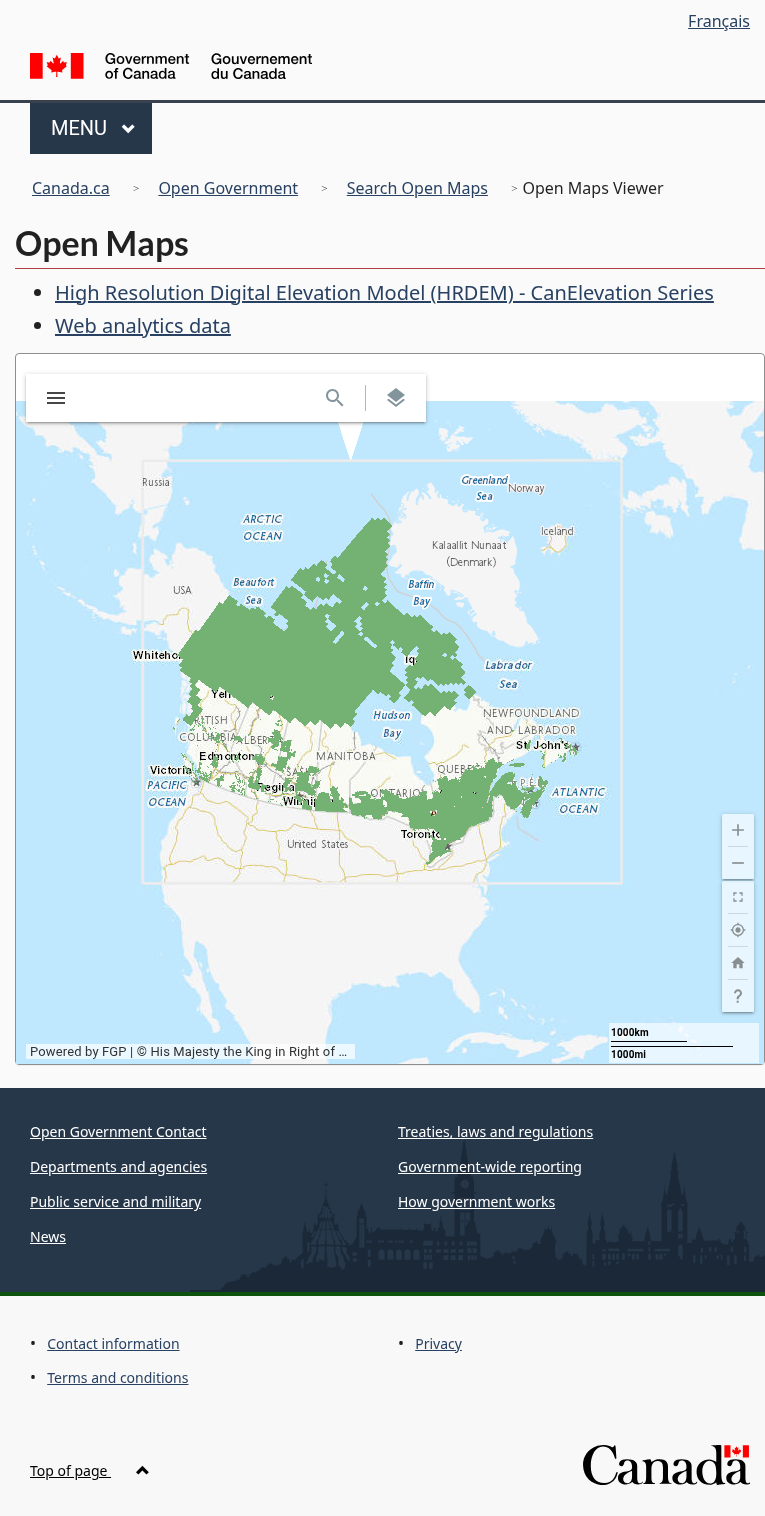
Interactive map showing HRDEM coverage across Canada
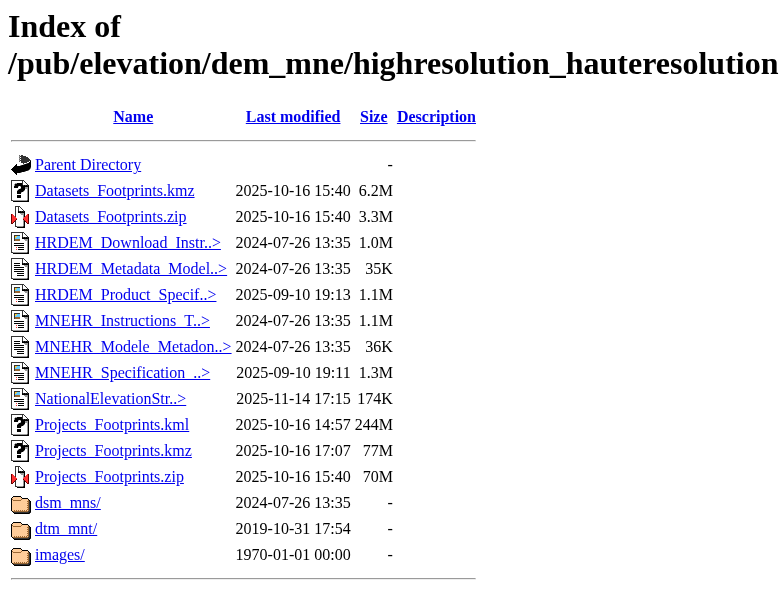
The FTP directory structure for HRDEM data
03
Navigate the FTP Directory
The actual data files are hosted on Canada’s FTP server:
ftp.maps.canada.ca/pub/elevation/dem_mne/highresolution_hauteresolution/
The directory is organized as follows:
- dsm_mns/ — Digital Surface Model data
- dtm_mnt/ — Digital Terrain Model data
- Projects_Footprints.kmz — Google Earth file to locate your area
- Datasets_Footprints.zip — Shapefile index of all tiles
04
Select Resolution and Region
Inside the DTM or DSM folder, choose your resolution:
1m resolution (dtm_mnt/1m/)
- 10 km × 10 km tiles
- Highest detail, best for engineering and detailed analysis
- Larger file sizes (100-400 MB per tile)
2m resolution (dtm_mnt/2m/)
- 20 km × 20 km tiles
- Good balance of detail and file size
- Better for regional analysis
Data is then organized by province/territory abbreviation (ON, BC, AB, etc.) or by contributing organization.
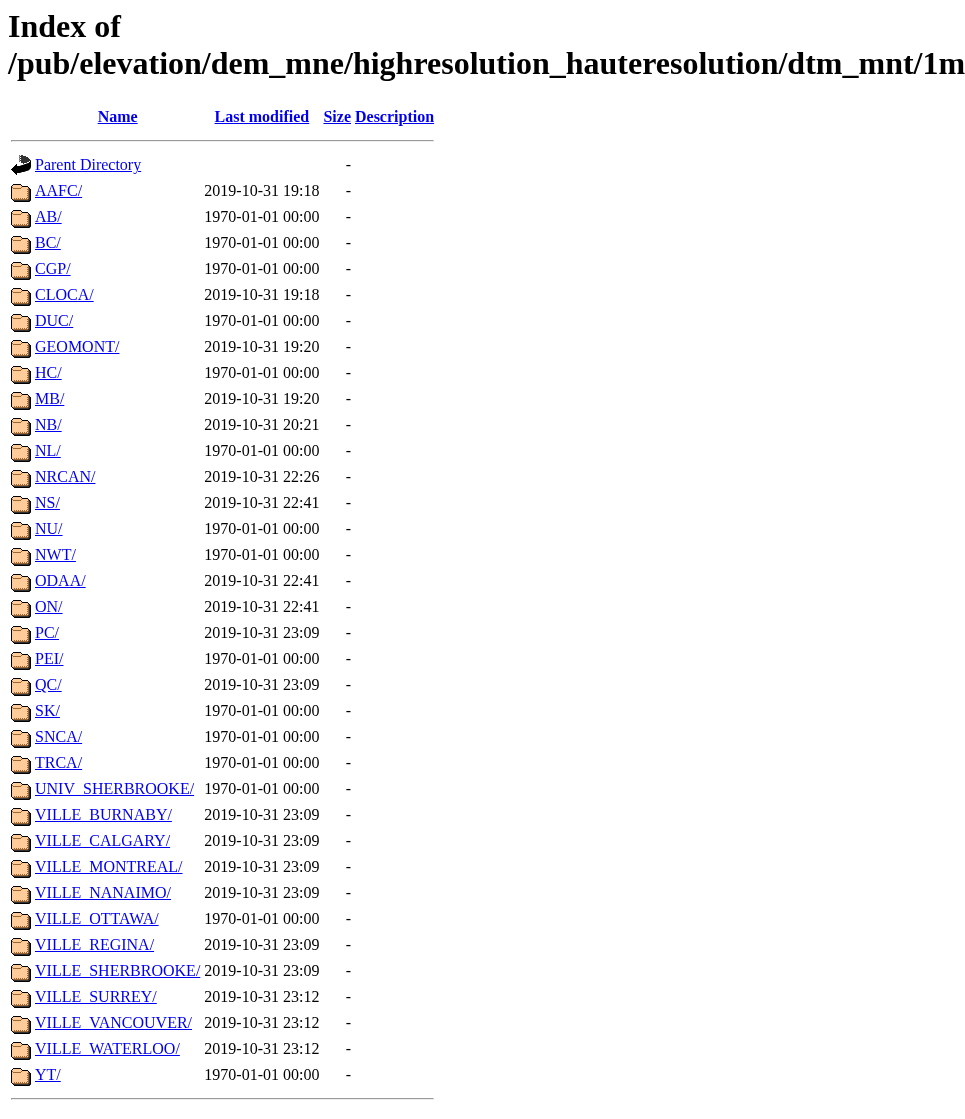
Data organized by province and contributing organization
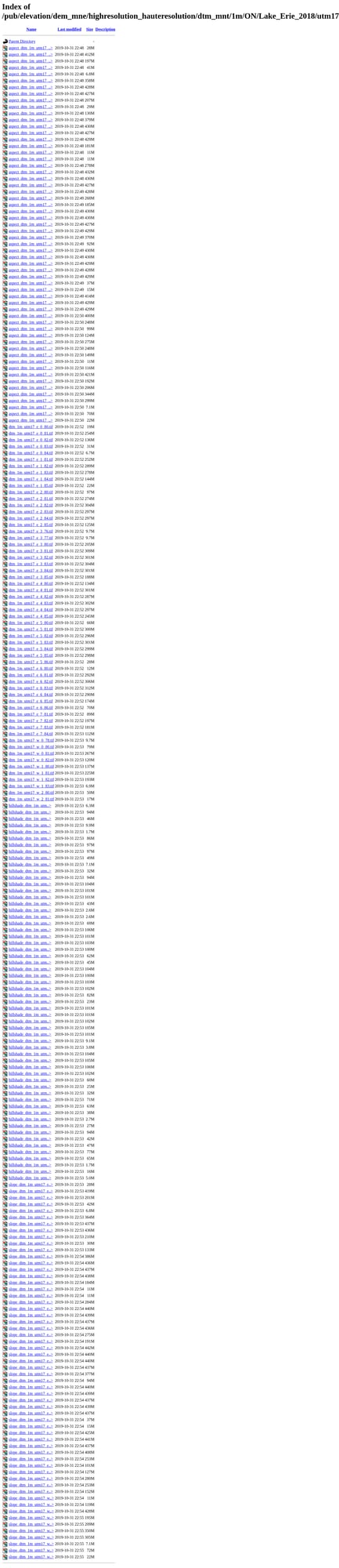
Individual GeoTIFF files ready to download
05
Download Your Files
Navigate to your project folder (e.g., ON/Lake_Erie_2018/) and then the UTM zone subfolder. Each project contains:
- dtm_*.tif — Raw elevation data (32-bit float GeoTIFF)
- hillshade_*.tif — Pre-rendered shaded relief
- slope_*.tif — Slope gradient maps
- aspect_*.tif — Slope direction maps
- INDEX_*.kmz — Tile index for Google Earth
- Metadata_*.gdb.zip — Metadata geodatabase
Click on any file to download directly, or use a download manager for bulk downloads.
Available File Formats
HRDEM data is distributed as Cloud Optimized GeoTIFFs (COG) with consistent naming conventions based on UTM coordinates.
| Product | Format | Description |
|---|---|---|
| DTM | GeoTIFF (32-bit float) | Bare-earth elevation in meters, referenced to CGVD2013 |
| DSM | GeoTIFF (32-bit float) | First-return surface elevation including vegetation and structures |
| Hillshade | GeoTIFF (8-bit) | Shaded relief for visualization, azimuth 315°, altitude 45° |
| Slope | GeoTIFF (32-bit float) | Terrain gradient in degrees (0-90°) |
| Aspect | GeoTIFF (32-bit float) | Slope direction in degrees (0-360°, clockwise from north) |
| Color Relief | GeoTIFF (RGB) | Color-coded elevation visualization |
Tips for Working with HRDEM Data
📍 Use the KMZ Index Files
Download the Projects_Footprints.kmz file and open it in Google Earth. This makes it easy to visually identify which project covers your area before navigating the FTP directories.
📦 Understand the Coordinate Systems
Southern data uses UTM NAD83 (CSRS) by zone. Arctic data uses Polar Stereographic North (WGS84). Check the UTM zone number in the file path to ensure proper georeferencing.
💾 Plan Your Storage
1m DTM tiles can be 100-400 MB each, and derived products (slope, aspect, hillshade) multiply storage needs. For large areas, consider using STAC API for selective downloads.
🔄 Check for Updates
HRDEM coverage is continuously expanding as new LiDAR data is collected. The dataset page shows the last modified date. Sign up for notifications on Open Government to know when new areas are added.
Process Your HRDEM Data in Lidarvisor
Already have GeoTIFF DEMs from HRDEM? Lidarvisor can help you take your analysis further.
With Lidarvisor, you can:
✦ Upload GeoTIFFs and visualize them in 3D
✦ Generate contour lines at custom intervals
✦ Create cross-section profiles for terrain analysis
✦ Export to CAD-ready formats (DXF, SHP)
✦ Process large datasets without hardware limitations
Frequently Asked Questions
Yes! All HRDEM data is released under the Open Government Licence – Canada, which allows free use for any purpose including commercial applications. You can download, modify, and redistribute the data with proper attribution to Natural Resources Canada.
The Digital Terrain Model (DTM) represents bare-earth elevation with vegetation, buildings, and other features removed. The Digital Surface Model (DSM) includes the first-return elevations, capturing trees, structures, and other above-ground features. Use DTM for hydrological modeling and earthwork calculations; use DSM for viewshed analysis and urban planning.
HRDEM coverage is being built progressively through partnerships with provincial and territorial governments, municipalities, and federal agencies. Urban and southern areas generally have better coverage. Check the Projects_Footprints.kmz file for current coverage, and note that new data is continuously being added.
For southern Canada, data is in UTM NAD83 (CSRS) with zone numbers matching your longitude. Arctic data (north of the productive forest line) uses Polar Stereographic North (WGS84). The UTM zone is indicated in the folder path (e.g., utm17 for Zone 17). Vertical datum is CGVD2013 (Canadian Geodetic Vertical Datum of 2013).
For bulk downloads, you have several options: (1) Use a download manager like wget or curl with recursive options, (2) Access the STAC API for programmatic tile selection, or (3) Use tools like QGIS with the STAC plugin to query and download only the tiles intersecting your area of interest. The API endpoint is available on the dataset page.
Absolutely! HRDEM is designed to work with other CanElevation Series products including the Medium Resolution DEM (MRDEM) for broader coverage at 30m resolution. It’s also compatible with provincial LiDAR programs, National Hydro Network data, and GeoBase layers. Just ensure coordinate systems match when combining datasets.