
Learn LiDAR
AI Point Cloud Classification: 10x Faster Ground Filtering
Automate ground, vegetation, buildings, and corridor classes in one cleaner workflow
No credit card required • 50 hectares included
Artificial intelligence helps LiDAR teams move from raw points to usable classes faster, with less manual cleanup and more consistent outputs across difficult terrain, dense vegetation, and built environments.
Why Automated Ground Filtering Wins
Manual Filtering
Manual classification often means repeated parameter changes, slow QA passes, and inconsistent separation between bare earth, low vegetation, buildings, and corridor assets whenever site conditions change.
Automated Classification
Lidarvisor helps teams upload LAS or LAZ files, separate key classes faster, and move into terrain modeling, forestry review, or corridor inspection with cleaner outputs and fewer re-runs.
What Automated Classification Can Handle
Ground Filtering
Separate bare earth from vegetation and structures so terrain deliverables start from cleaner inputs.
Vegetation Layers
Sort low, medium, and high vegetation faster for forestry review, canopy checks, and land management.
Buildings & Hardscape
Keep roofs, paved surfaces, and urban features distinct for mapping, planning, and downstream CAD work.
Utility Corridors
Review power line corridors, roadside assets, and edge conditions with clearer class separation.
Turn raw points into a cleaner working view
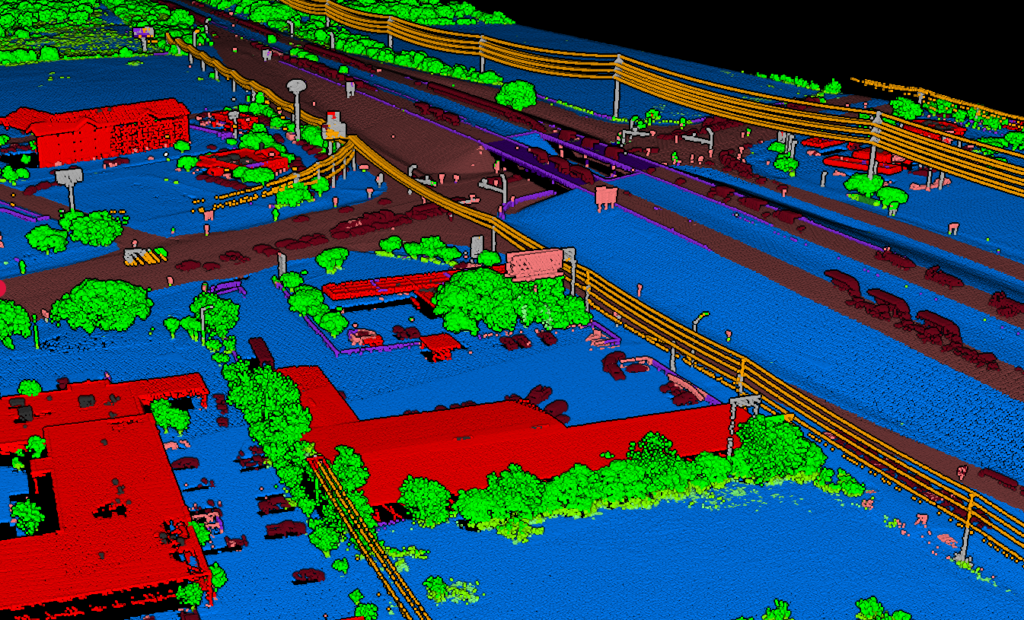
See major classes separated earlier so review takes less effort and follow-on work moves faster
Automated classification is most useful when it reduces the amount of manual cleanup between upload and delivery. A cleaner first pass makes it easier to spot gaps, confirm the terrain surface, and hand off results with more confidence.
- Review class separation visually before export
- Reduce repeated manual filtering across similar jobs
- Keep the workflow readable for mixed urban and natural scenes
A Simple Workflow for Faster Ground Classification
Upload Your LAS/LAZ
Bring in the point cloud and start from the same interface your team already uses for review and export workflows.
Run Automated Classes
Separate ground, vegetation, buildings, and infrastructure without rebuilding the workflow for every terrain type.
Review the Result
Confirm the surface looks right, inspect dense areas, and make sure the job is ready for terrain, forestry, or corridor follow-up.
Export and Deliver
Move faster into deliverables once the point cloud is cleaner and the class structure is easier to trust across the full site.
Built for Real LiDAR Workflows
Survey Teams
Clean ground classes sooner for terrain review, contours, and mapping deliverables.
Forestry
Separate canopy and understory faster when vegetation density changes across the site.
Planning & Mapping
Keep buildings, hardscape, and land cover easier to interpret in complex urban scenes.
Utility Corridors
Keep corridor review moving when lines, vegetation, and access routes share the same space.
Keep terrain, forestry, and corridor review moving
When the first classification pass is cleaner, every downstream deliverable becomes easier to review
Ground filtering is rarely the final output. It is the step that helps everything after it move with less friction, whether the job ends in terrain modeling, land cover review, or corridor inspection.
- Reduce back-and-forth before terrain generation
- Keep corridor scenes easier to inspect in dense vegetation
- Hand off cleaner classified clouds for export and reporting
Frequently Asked Questions
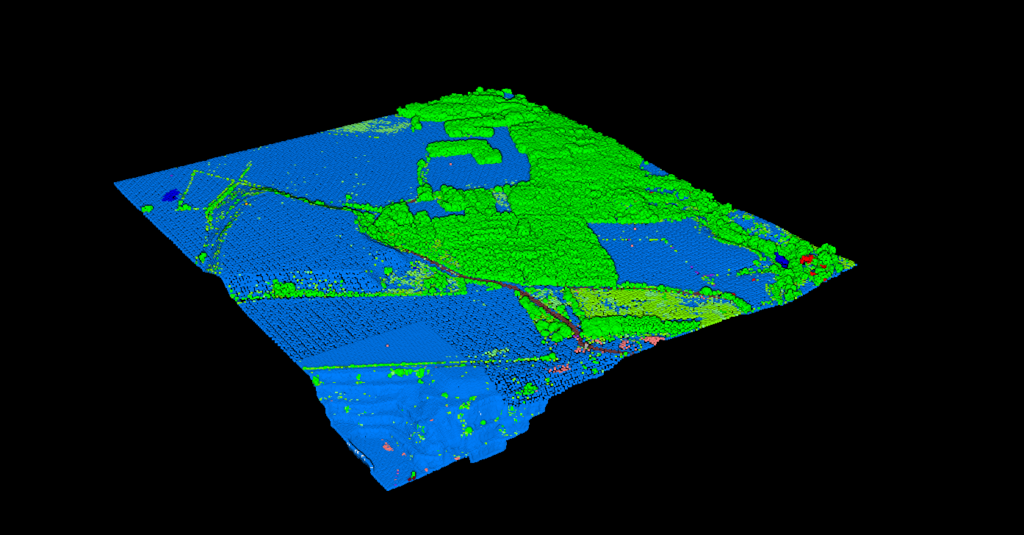
Can this help with more than ground filtering?
Yes. Ground classification is usually the first need, but the same workflow can also help separate vegetation, buildings, and other site features so the full point cloud is easier to review and use downstream.
Do I need to tune settings for every site?
The goal of automated classification is to reduce how often teams need to reset the workflow between terrain types. Instead of repeating the same manual filtering steps across every project, you can move faster into review and delivery.
What files can I start with?
Most LiDAR teams start from standard LAS or LAZ point cloud files, then review the classified output before exporting or continuing into the next processing step.
Can I review the classes before export?
Yes. A visual review step helps confirm that ground, vegetation, and structures are separated the way you expect before the job moves into terrain, corridor, or mapping deliverables.
Who is this workflow best for?
It is especially useful for surveyors, forestry teams, utility corridor reviewers, and mapping groups that need faster classification without adding more manual cleanup to each project.
Ready to speed up your classification workflow?
Upload your point cloud, separate key classes faster, and move into terrain, corridor, or mapping work with a cleaner starting point.
Create free account50 hectares free. No credit card. No software to install.